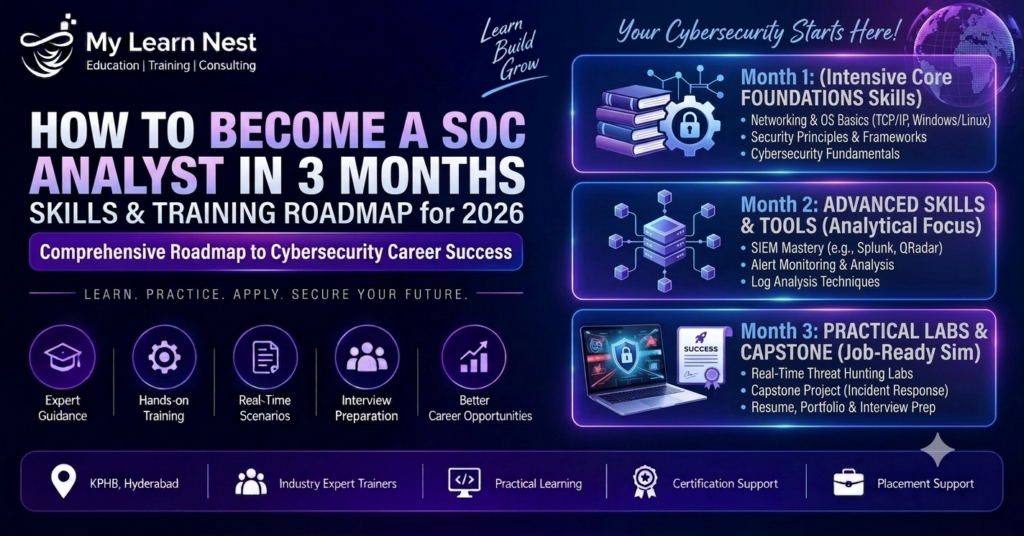
Want to start a career in cybersecurity but don’t know where to begin?
If your goal is to become a SOC Analyst, a focused 3-month learning plan can help you build the foundation, practical skills, projects, and interview readiness needed for entry-level opportunities.
However, 3 months should be viewed as an intensive job-preparation roadmap, not a guarantee of employment. Your starting knowledge, daily study time, hands-on practice, and ability to demonstrate your skills all matter.
A modern SOC Analyst works with security alerts, logs, SIEM platforms, endpoints, threat intelligence, cloud environments and incident-response processes. Current SOC guidance also increasingly emphasizes cloud security, query skills, automation and AI-assisted operations alongside traditional monitoring. (mylearnnest.com)
🚀 8 Highlights of This 3-Month SOC Roadmap
🛡️ 1. Start With Security Fundamentals
Build the networking, Windows, Linux and cybersecurity knowledge required for SOC investigations.
🔎 2. Learn How to Investigate Alerts
Move beyond theory and practice identifying suspicious activity.
📊 3. Master SIEM Fundamentals
Learn how security logs are collected, searched, correlated and investigated.
💻 4. Understand Endpoint Security
Learn the basics of EDR, processes, malware alerts and endpoint investigation.
☁️ 5. Add Cloud Security
Understand cloud identities, authentication and security events.
🧠 6. Learn MITRE ATT&CK & Threat Hunting
Understand attacker behavior and how analysts investigate suspicious activity.
🤖 7. Explore Automation & AI-Assisted SOC Work
Understand how automation can reduce repetitive tasks while analysts validate important findings. (Express Computer)
💼 8. Finish With Projects & Interview Preparation
Turn your learning into practical evidence you can discuss during interviews.
What Does a SOC Analyst Do?
A Security Operations Center (SOC) Analyst monitors an organization’s technology environment for suspicious or potentially malicious activity.
Typical responsibilities can include:
- Monitoring security alerts
- Reviewing logs
- Investigating suspicious activity
- Analyzing authentication events
- Investigating endpoint activity
- Checking threat intelligence
- Identifying false positives
- Documenting incidents
- Escalating confirmed or high-risk incidents
- Supporting incident response
A simple SOC workflow looks like:
Alert → Triage → Investigation → Evidence → Verdict → Documentation → Escalation
The goal isn’t simply to close alerts.
The goal is to understand what happened, why it happened, whether it is malicious, and what should happen next.
Can You Become a SOC Analyst in 3 Months?
Yes, you can build a strong entry-level foundation in three months if you study consistently and practice regularly.
But there is an important difference between:
Completing a 3-month course
and
Becoming job-ready in 3 months.
Job readiness requires more than watching classes.
You should finish the three months with:
- Networking knowledge
- Windows/Linux fundamentals
- Cybersecurity fundamentals
- SIEM experience
- Log-analysis skills
- Alert-triage experience
- Basic EDR knowledge
- Threat-intelligence skills
- Incident-response knowledge
- Practical projects
- Resume
- Interview preparation
Some published SOC roadmaps recommend substantially longer timelines for beginners, so a three-month plan is best treated as an intensive foundation and job-preparation sprint, rather than a universal timeline for everyone. (Learners Ink)
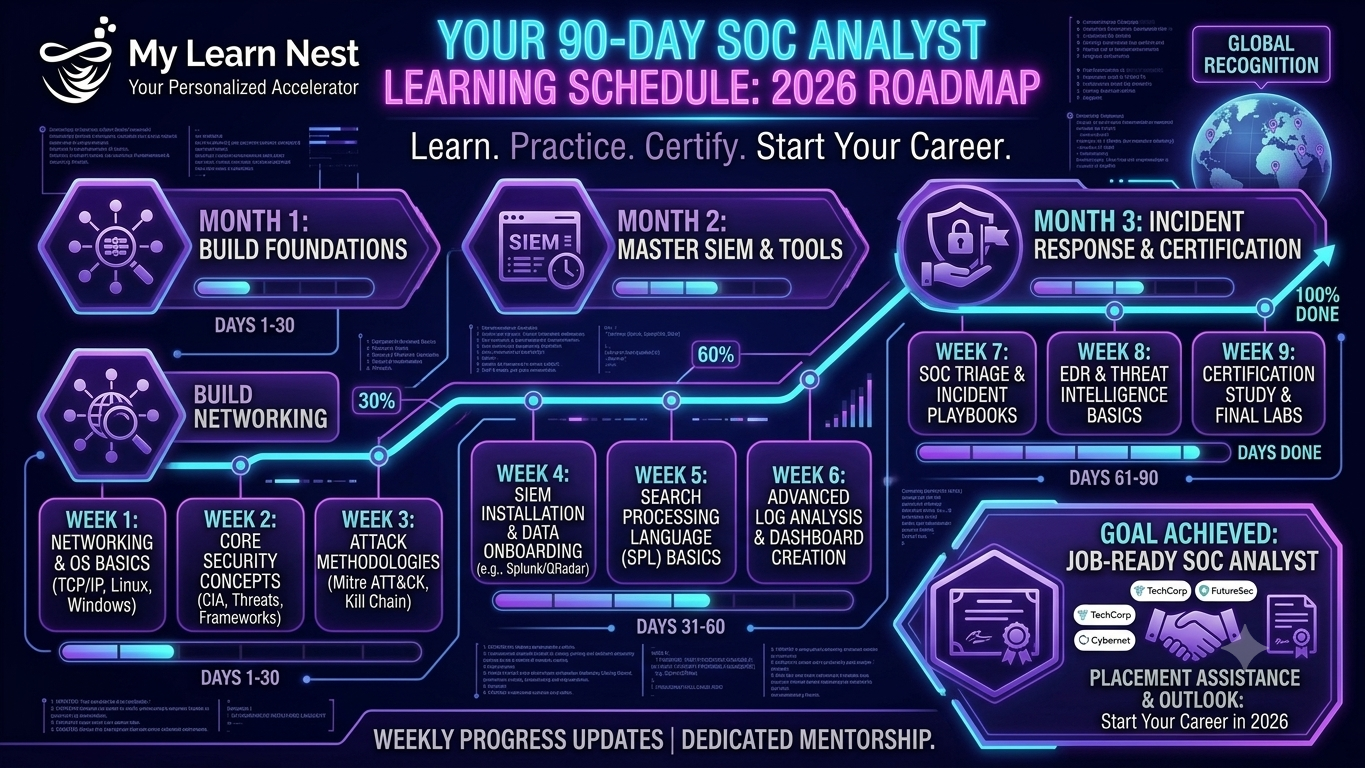
Month 1: Build Your Cybersecurity Foundation
The first month should focus on understanding how computers, networks and operating systems work.
Module 1: Computer & Security Fundamentals
Learn:
- Computer architecture basics
- Operating systems
- Users and permissions
- Processes
- Files and directories
- Authentication
- Authorization
- CIA Triad
- Security controls
- Threats
- Vulnerabilities
- Risk
Goal
Understand the basic environment that a SOC Analyst is responsible for monitoring.
Module 2: Networking Fundamentals
Networking is one of the most important skills for SOC analysts.
Learn:
- OSI Model
- TCP/IP
- IP addresses
- MAC addresses
- Ports
- TCP vs UDP
- DNS
- DHCP
- HTTP/HTTPS
- SSH
- SMTP
- VPN
- Firewalls
- Proxies
- Network traffic
Practical Exercise
Take a network connection and identify:
Source IP → Destination IP → Port → Protocol → Activity
This creates the foundation for investigating suspicious network traffic.
Module 3: Windows Security
Learn:
- Windows users
- Processes
- Services
- Event Viewer
- Windows Security Logs
- Authentication events
- Active Directory basics
- PowerShell basics
- File activity
- Scheduled tasks
- Security events
Practical Exercise
Investigate a series of failed Windows login attempts and determine whether the activity looks suspicious.
Module 4: Linux Security
Learn:
- Linux commands
- Users
- Permissions
- Processes
- Services
- SSH
- Authentication
- System logs
- Network commands
- File permissions
Practical Exercise
Analyze Linux authentication logs and identify unusual login behavior.
Module 5: Cybersecurity Fundamentals
Learn the basics of:
- Malware
- Phishing
- Ransomware
- Brute-force attacks
- Credential attacks
- Social engineering
- Vulnerabilities
- Exploitation
- Authentication attacks
- Network attacks
- Data exfiltration
Month 1 Target
By the end of Month 1, you should be able to explain:
How computers communicate, how users authenticate, where security logs are generated, and what common cyber attacks look like.
Month 2: Learn Core SOC Operations
Month 2 is where your learning becomes more SOC-focused.
Module 6: Log Analysis
Learn how to understand:
- Windows logs
- Linux logs
- Firewall logs
- Authentication logs
- Network logs
- Endpoint logs
- Cloud logs
Focus on:
- Timestamp
- Source IP
- Destination IP
- Username
- Event type
- Process
- Action
- Status
Investigation Question
Don’t simply ask:
“What does this log say?”
Ask:
“Does this event make sense in context?”
Module 7: SIEM
SIEM is one of the most important technologies for a SOC Analyst.
Learn:
- SIEM architecture
- Log collection
- Log ingestion
- Log normalization
- Correlation
- Dashboards
- Security alerts
- Detection rules
- Search
- Investigation
- False-positive analysis
Common SIEM platforms include:
- Microsoft Sentinel
- Splunk
- IBM QRadar
- Elastic Security
- Wazuh
My Learnnest’s current SOC training material similarly emphasizes networking, Windows/Linux, SIEM, log analysis, incident investigation and practical training. (mylearnnest.com)
Module 8: KQL / SPL Query Skills
Don’t just learn how to open a SIEM.
Learn how to search security data.
Depending on the platform, practice:
- KQL
- SPL
- Filtering
- Searching
- Aggregation
- Time-based investigation
- Authentication queries
- IP-based investigation
- User-based investigation
Example Investigation
Multiple failed logins
↓
Search authentication logs
↓
Identify source IP
↓
Check successful login
↓
Investigate user
↓
Check related events
↓
Determine true or false positive
Module 9: Alert Triage
SOC Analysts need to prioritize alerts.
Learn how to assess:
- Severity
- Asset criticality
- User privilege
- Threat intelligence
- Frequency
- Attack behavior
- Business impact
Example
A suspicious login to a privileged administrator account may require more urgent investigation than a similar event involving a low-risk test account.
Module 10: Threat Intelligence
Learn how analysts investigate:
- IP addresses
- Domains
- URLs
- File hashes
- Malware indicators
- Threat actors
- Indicators of Compromise
Investigation Flow
IOC → Reputation → Context → Related Indicators → Verdict
Module 11: EDR & Endpoint Investigation
Learn:
- EDR fundamentals
- XDR concepts
- Endpoint telemetry
- Processes
- Parent/child processes
- Command-line activity
- Suspicious files
- Malware alerts
- Endpoint isolation
- Persistence
Practical Scenario
Suspicious PowerShell
↓
Identify process
↓
Check parent process
↓
Check command
↓
Check network connection
↓
Investigate IOC
↓
Determine severity
↓
Document findings
Module 12: Phishing Investigation
Practice investigating:
- Sender
- Email headers
- URLs
- Domains
- Attachments
- IP addresses
- File hashes
- User activity
The goal is to determine whether the email is:
Legitimate → Suspicious → Malicious
Month 2 Target
By the end of Month 2, you should be able to:
- Read security logs
- Perform basic SIEM searches
- Investigate alerts
- Identify suspicious authentication activity
- Investigate basic endpoint events
- Perform IOC checks
- Analyze phishing scenarios
- Distinguish basic true positives from false positives
Month 3: Become Interview & Project Ready
The third month should focus heavily on investigation, projects, documentation and interviews.
Module 13: Incident Response
Learn the basic incident-response lifecycle:
Preparation → Detection → Analysis → Containment → Eradication → Recovery → Lessons Learned
Practice scenarios such as:
- Malware
- Phishing
- Brute force
- Account compromise
- Suspicious PowerShell
- Ransomware indicators
- Data-exfiltration indicators
Module 14: MITRE ATT&CK
Learn how attacker behavior can be mapped to:
- Tactics
- Techniques
- Sub-techniques
Practice taking an investigation and asking:
“Which attacker behavior does this activity represent?”
This helps connect individual alerts to a broader attack story.
Module 15: Threat Hunting
Move beyond waiting for alerts.
Learn:
- IOC hunting
- Behavioral hunting
- Authentication hunting
- Endpoint hunting
- PowerShell hunting
- Suspicious process hunting
- Lateral movement indicators
- Persistence indicators
Simple Hunting Model
Hypothesis → Search → Evidence → Analysis → Finding
Module 16: Cloud Security Basics
Learn the fundamentals of:
- Azure
- AWS
- Microsoft Entra ID
- Cloud authentication
- Identity security
- Cloud activity logs
- Suspicious cloud logins
- MFA
- Cloud monitoring
Cloud security is increasingly part of SOC work, making it useful to include in a current learning roadmap. (SocMasters)
Module 17: SOC Automation & AI
Learn the concepts behind:
- SOAR
- Security playbooks
- Automated IOC enrichment
- Python basics
- PowerShell
- API-based workflows
- AI-assisted alert analysis
- Alert summarization
AI can help automate repetitive SOC tasks, but human analysts remain important for validation, judgment and critical security decisions. (Express Computer)
Module 18: SOC Documentation
Learn how to write:
Alert Summary
What was detected?
Investigation
What did you check?
Evidence
What did you find?
Verdict
True positive or false positive?
Impact
What could be affected?
Action
What should happen next?
Good documentation is an important part of professional SOC work.
3-Month SOC Project Plan
Don’t finish your course with only certificates.
Finish with projects you can demonstrate.
Project 1: Brute-Force Investigation
Investigate:
- Failed logins
- Source IP
- Target account
- Successful authentication
- Timeline
- Suspicious behavior
Project 2: Phishing Investigation
Analyze:
- Sender
- URL
- Domain
- Attachment
- IP
- IOC
Then prepare an incident report.
Project 3: Malware Investigation
Investigate:
- File
- Hash
- Process
- Parent process
- Network connection
- Endpoint alert
Project 4: SIEM Investigation
Build the complete workflow:
Alert → Query → Evidence → IOC → MITRE ATT&CK → Verdict → Report
Project 5: Suspicious Cloud Login
Investigate:
- User
- Location
- Device
- Authentication
- MFA
- IP
- Risk indicators
Your 90-Day Learning Schedule