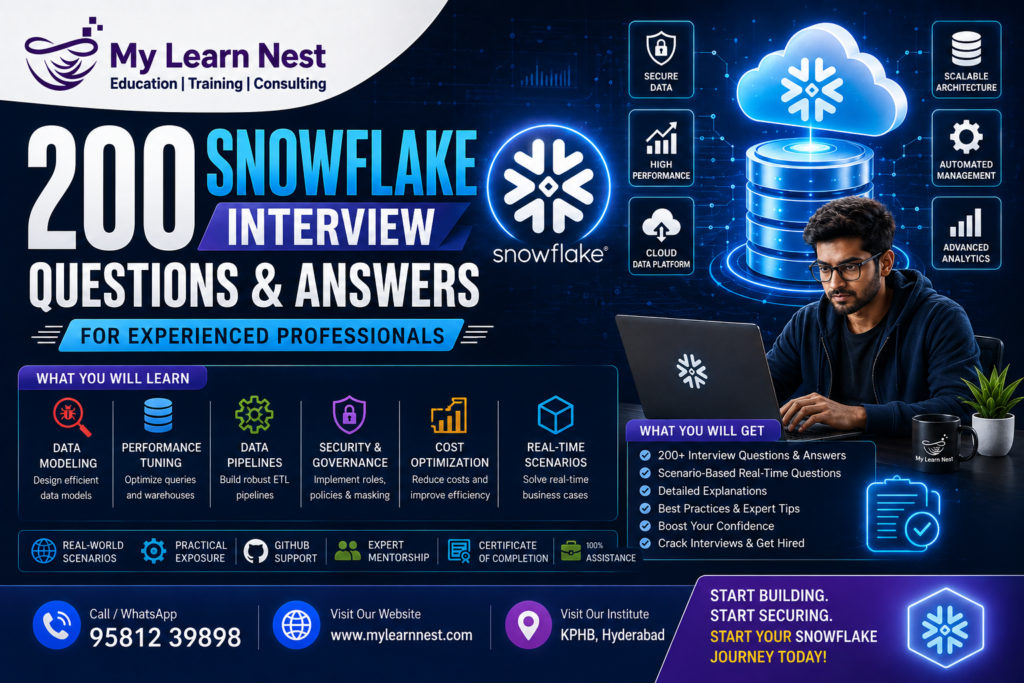
Snowflake Interview Questions for Experienced Professionals
Snowflake has become an important technology for organizations that work with large amounts of data. Many companies are moving from traditional data warehouses to cloud-based data platforms to improve scalability, performance, flexibility, and data accessibility.
For experienced professionals, a Snowflake interview is usually different from a fresher interview. Interviewers generally expect candidates to understand not only the basic features of Snowflake but also how to use them in real-world projects.
You may be asked to explain Snowflake architecture, design data pipelines, troubleshoot slow queries, reduce warehouse costs, implement incremental loading, handle CDC, manage security, optimize large tables, or explain a project you worked on.
This blog provides 200 Snowflake interview questions and answers for experienced professionals. The questions are explained in simple words so that you can revise important concepts quickly and prepare for technical and scenario-based interviews.
Whether you are applying for a Snowflake Data Engineer, Snowflake Developer, Cloud Data Engineer, Data Warehouse Developer, ETL Developer, or Analytics Engineer role, this guide can help you prepare more effectively.
Why Snowflake Skills Are Important for Experienced Professionals
Modern organizations generate data from applications, websites, APIs, cloud systems, business applications, and customer interactions.
Managing this growing amount of data requires scalable cloud data platforms. Snowflake provides capabilities for data warehousing, data engineering, analytics, data sharing, and other modern data workloads.
Experienced professionals who understand Snowflake can work on areas such as:
- Cloud data warehousing
- Data engineering
- ETL and ELT pipelines
- Data migration
- Data integration
- Data analytics
- Business intelligence
- Data governance
- Data security
- Performance optimization
However, experience with Snowflake means more than knowing SQL syntax. Companies often expect candidates to understand how to design reliable and scalable data solutions.
How Experienced Professionals Should Prepare for a Snowflake Interview
Experienced candidates should prepare in three major areas.
First, understand the fundamentals clearly. You should be able to explain Snowflake architecture, storage, compute, virtual warehouses, databases, schemas, tables, and views.
Second, focus on practical implementation. Learn how data is loaded using stages, COPY INTO, Snowpipe, and Snowpipe Streaming. Understand how Streams and Tasks support incremental processing.
Third, prepare for real-world scenarios. Interviewers may give you a business problem and ask you to design a solution.You should also be ready to explain your previous projects, including the source systems, data volume, pipeline design, technologies used, challenges, and performance improvements.
Snowflake Architecture Interview Questions
1. What is Snowflake?
Snowflake is a cloud-based data platform used for data storage, data processing, data warehousing, analytics, data engineering, and secure data sharing.
It provides a managed environment where organizations can work with large datasets without managing traditional database infrastructure.
2. Explain Snowflake architecture.
Snowflake architecture can be broadly understood through three major layers: storage, compute, and cloud services.
The storage layer manages data storage. The compute layer processes queries through virtual warehouses. The cloud services layer handles authentication, metadata management, access control, query optimization, and other platform services.
3. What makes Snowflake different from traditional data warehouses?
The major difference is the separation of storage and compute.
In traditional systems, storage and compute resources may be tightly connected. Snowflake allows them to scale independently, making it easier to support different workloads.
4. What is the storage layer in Snowflake?
The storage layer stores data in Snowflake’s managed cloud storage architecture.
Snowflake automatically manages data organization, compression, and other storage-related operations.
5. What is the compute layer?
The compute layer provides processing resources required to execute queries and data operations.
Snowflake uses virtual warehouses as compute resources.
6. What is the cloud services layer?
The cloud services layer manages platform-level functions such as authentication, metadata, access control, query optimization, and coordination.
7. What is a virtual warehouse?
A virtual warehouse is a cluster of compute resources used to execute SQL queries and perform data processing.
8. Why does Snowflake separate storage and compute?
Separation allows organizations to scale compute resources independently of storage.
For example, different teams can use separate warehouses to process the same data without creating separate copies of the data.
9. Can multiple warehouses access the same data?
Yes. Multiple virtual warehouses can access the same underlying data.
This helps organizations separate workloads such as reporting, data engineering, and data science.
10. What is a multi-cluster warehouse?
A multi-cluster warehouse can use multiple compute clusters to handle high concurrency.
It is particularly useful when many users or queries need to run simultaneously.
11. What is scaling up?
Scaling up means increasing the size of a virtual warehouse to provide more compute resources.
12. What is scaling out?
Scaling out generally means adding additional compute clusters to handle concurrent workloads.
13. When would you scale up a warehouse?
You may scale up when individual queries require more compute resources or when query execution is limited by available compute capacity.
14. When would you use multi-cluster warehouses?
Multi-cluster warehouses are useful when many users or queries run concurrently and the system needs additional compute clusters to handle demand.
15. What is Snowflake’s metadata layer?
Metadata contains information about database objects, data organization, and other system-level details used to manage and optimize queries.
16. What are micro-partitions?
Snowflake automatically organizes table data into small storage units called micro-partitions.
Micro-partition metadata helps Snowflake identify which data needs to be scanned for a query.
17. What is partition pruning?
Partition pruning means avoiding unnecessary micro-partitions during query execution.
If a query filter matches specific micro-partition metadata, Snowflake may scan only the relevant partitions.
18. What is clustering?
Clustering refers to organizing large amounts of data in a way that can improve pruning for specific query patterns.
19. What is a clustering key?
A clustering key is a column or expression selected to influence how data is organized for large tables.
20. When should clustering be used?
Clustering should generally be considered for large tables where queries frequently filter on specific columns and natural data organization does not provide sufficient pruning.
Snowflake Database and Schema Interview Questions
21. What is a database in Snowflake?
A database is a logical container used to organize schemas and other database objects.
22. What is a schema?
A schema is a logical container inside a database used to organize objects such as tables, views, stages, and file formats.
23. Explain the Snowflake object hierarchy.
A simplified hierarchy is:
Account → Database → Schema → Database Objects
Objects can include tables, views, stages, file formats, procedures, and other supported objects.
24. What is a table?
A table stores structured data in rows and columns.
25. What is a view?
A view is a logical representation of data based on a SQL query.
26. What is a materialized view?
A materialized view stores query results to improve performance for eligible repeated query patterns.
27. What is the difference between a view and a materialized view?
A standard view generally evaluates its underlying query when accessed, while a materialized view maintains stored results that Snowflake can use for supported performance improvements.
28. What are transient tables?
Transient tables are designed for temporary or intermediate data where long-term disaster recovery requirements may be different from permanent tables.
29. What are temporary tables?
Temporary tables exist only for the duration of a session and are useful for intermediate processing.
30. What are permanent tables?
Permanent tables are designed for long-term data storage and provide standard Snowflake data protection and recovery features based on applicable settings.
Snowflake Data Loading Interview Questions
31. How do you load data into Snowflake?
Data can be loaded using different methods, including:
- COPY INTO
- Snowpipe
- Snowpipe Streaming
- Connectors
- APIs
- ETL and ELT tools
32. What is a stage?
A stage is a location used to store data files before loading them into Snowflake.
33. What is an internal stage?
An internal stage is a storage location managed within Snowflake.
34. What is an external stage?
An external stage references a location in external cloud storage.
35. What is COPY INTO?
COPY INTO is a SQL command used to load data from a stage into a Snowflake table.
36. What is bulk loading?
Bulk loading involves loading a batch of data files into Snowflake, usually through staged files and COPY INTO.
37. What is Snowpipe?
Snowpipe is used for continuous or near-real-time file-based data ingestion.
38. What is Snowpipe Streaming?
Snowpipe Streaming allows applications to send rows directly into Snowflake for low-latency ingestion use cases.
39. What is the difference between Snowpipe and Snowpipe Streaming?
Traditional Snowpipe is mainly designed around automated file ingestion, while Snowpipe Streaming is designed for direct row-level ingestion with lower latency.
40. What is a file format?
A file format defines how Snowflake should interpret files during loading or unloading.
Supported formats include CSV, JSON, Parquet, Avro, ORC, and XML.
Snowflake Data Pipeline Interview Questions
41. How would you design a Snowflake data pipeline?
A common pipeline may follow this architecture:
Source System → Cloud Storage → External Stage → Snowpipe → Raw Table → Transformation → Target Table → BI or Reporting
The exact architecture depends on data volume, latency requirements, and business needs.
42. What is ETL?
ETL means Extract, Transform, Load.
Data is extracted from sources, transformed before loading, and then stored in the target system.
43. What is ELT?
ELT means Extract, Load, Transform.
Data is first loaded into the target platform and transformed within the platform.
Snowflake is commonly used in ELT architectures.
44. Why is ELT popular with Snowflake?
Snowflake provides scalable compute resources that can process large amounts of data after it has been loaded.
This allows organizations to keep raw data and perform transformations inside Snowflake.
45. How do you handle incremental data loading?
Incremental loading can be implemented using timestamps, source-system change indicators, Streams, CDC mechanisms, or other change-tracking approaches.
46. What is CDC?
CDC stands for Change Data Capture.
It identifies changes such as inserts, updates, and deletes from source systems so that only changed data can be processed.
47. How can Snowflake support CDC?
Snowflake Streams can help track changes in supported tables. These changes can then be processed through SQL transformations or Tasks.
48. How do you design a reliable data pipeline?
A reliable pipeline should include:
- Error handling
- Monitoring
- Data validation
- Retry mechanisms
- Logging
- Incremental processing
- Security
- Recovery procedures
49. How do you handle duplicate records?
Duplicates can be handled using unique business keys, window functions, MERGE statements, deduplication logic, or source-system controls.
50. What is an idempotent pipeline?
An idempotent pipeline produces the same final result when the same input is processed multiple times.
This is useful for preventing duplicate data during retries.
Snowflake SQL Interview Questions
51. What is MERGE?
MERGE is used to perform conditional INSERT, UPDATE, or DELETE operations based on matching conditions.
52. When would you use MERGE?
MERGE is commonly used in incremental loading and CDC pipelines.
53. What is a CTE?
A Common Table Expression is a temporary named result set created using the WITH clause.
54. What are window functions?
Window functions perform calculations across a group of related rows without collapsing them into a single row.
55. Name some common window functions.
Common examples include:
- ROW_NUMBER
- RANK
- DENSE_RANK
- LEAD
- LAG
- SUM
- AVG
56. What is ROW_NUMBER?
ROW_NUMBER assigns a unique sequential number to rows within a defined partition.
57. How do you remove duplicates using ROW_NUMBER?
You can partition records by the business key, order them by the latest timestamp, and retain only the row with row number one.
58. What is QUALIFY?
QUALIFY is used to filter results of window functions.
59. What is the difference between WHERE and QUALIFY?
WHERE filters rows before window functions are evaluated, while QUALIFY filters the results after window functions are calculated.
60. How do you find the latest record for each customer?
A common approach is to use ROW_NUMBER with PARTITION BY customer ID and ORDER BY timestamp descending, then filter using QUALIFY.
Snowflake Semi-Structured Data Questions
61. How does Snowflake handle semi-structured data?
Snowflake supports formats such as JSON, Avro, Parquet, and other semi-structured data formats.
62. What is VARIANT?
VARIANT is a Snowflake data type that can store semi-structured data.
63. What is OBJECT?
OBJECT represents key-value structures in semi-structured data.
64. What is ARRAY?
ARRAY represents an ordered collection of values.
65. What is FLATTEN?
FLATTEN is used to convert nested arrays or objects into rows.
66. How do you query JSON data?
JSON data can be stored in VARIANT columns and accessed using Snowflake’s semi-structured data syntax and functions.
67. How do you handle nested JSON?
Nested JSON can be accessed using path expressions and FLATTEN when arrays or nested structures need to be converted into rows.
68. What is schema evolution?
Schema evolution occurs when the structure of incoming data changes over time, such as when new fields are introduced.
69. How do you process changing JSON structures?
You can use flexible VARIANT storage, controlled transformation logic, validation, and schema management processes.
70. Why is semi-structured data support useful?
It allows organizations to work with modern application data without forcing every field into a rigid relational structure immediately.
Snowflake Streams Interview Questions
71. What is a Stream?
A Stream records change information for supported Snowflake objects so that downstream processes can identify changed data.
72. What is the purpose of a Stream?
Streams are commonly used for incremental processing and CDC workflows.
73. Does a Stream store complete table data?
No. A Stream tracks change information rather than acting as a complete duplicate of the source table.
74. What types of changes can a Stream identify?
Depending on the supported object and configuration, Streams can provide information about inserted, updated, and deleted rows.
75. What is append-only Stream?
An append-only Stream is designed for workloads where only newly inserted rows are relevant.
76. What is the difference between standard and append-only Streams?
A standard Stream can track broader change information, while an append-only Stream focuses on inserted records.
77. How are Streams used in CDC pipelines?
A Stream captures changes, and downstream processing consumes those changes to update target tables.
78. What happens after a Stream is consumed?
The Stream’s change tracking advances based on the transaction that consumes it.
79. Can multiple processes use the same Stream?
Careful pipeline design is required because consuming change data advances the Stream position. Separate Streams may be appropriate for independent consumers.
80. What is a stale Stream?
A Stream can become stale if its required change data is no longer available within the applicable retention period.
Snowflake Tasks Interview Questions
81. What is a Task?
A Task is used to automate SQL execution and data processing workflows.
82. Can Tasks be scheduled?
Yes. Tasks can be scheduled to run at defined intervals.
83. What is a Task graph?
A Task graph is a dependency structure where Tasks execute in a defined sequence.
84. How do Streams and Tasks work together?
A Stream identifies changed records, and a Task processes those records automatically.
85. How can you create an incremental pipeline?
A common approach is:
Source Table → Stream → Task → MERGE → Target Table
86. How do you monitor Tasks?
Task history and system monitoring features can be used to review task execution and identify failures.
87. How do you handle failed Tasks?
You can review task history, identify the failure cause, fix the underlying issue, and use supported retry or restart approaches.
88. What is a scheduled Task?
A scheduled Task executes based on a defined schedule.
89. What is a triggered Task?
A triggered Task can execute based on conditions or dependencies in a Task workflow.
90. What is the advantage of Task graphs?
Task graphs help organize complex workflows into multiple dependent processing steps.
Snowflake Time Travel and Fail-safe Questions
91. What is Time Travel?
Time Travel allows access to historical data within the configured retention period.
92. Why is Time Travel useful?
It can help recover accidentally deleted or modified data and investigate previous data states.
93. What is Fail-safe?
Fail-safe is a separate recovery mechanism provided by Snowflake after the Time Travel period for eligible data.
94. Is Fail-safe user-accessible?
Fail-safe is not designed as a normal user-accessible backup system. Recovery is handled according to Snowflake’s recovery processes.
95. What is the difference between Time Travel and Fail-safe?
Time Travel supports user-level historical access and recovery within its retention period. Fail-safe is intended for disaster recovery after Time Travel is no longer available.
96. How do you recover a dropped table?
If it is still within the applicable Time Travel period, supported recovery commands can be used.
97. How do you recover deleted data?
You can use Time Travel features to query or restore historical data when it remains available.
98. What is retention time?
Retention time defines how long historical data can be accessed using Time Travel.
99. Can Time Travel be used for auditing?
It can help investigate historical data states, but organizations may still require dedicated audit and logging solutions.
100. Is Time Travel a replacement for backups?
No. Organizations should maintain appropriate backup and disaster recovery strategies.
Snowflake Zero-Copy Cloning Questions
101. What is Zero-Copy Cloning?
Zero-Copy Cloning allows users to create clones of supported objects without immediately duplicating all underlying data.
102. What can be cloned?
Depending on Snowflake support and object type, databases, schemas, and tables can be cloned.
103. Why is cloning useful?
Cloning is useful for:
- Development
- Testing
- QA
- Data validation
- Temporary analysis
104. Does cloning immediately copy all data?
No. Snowflake uses metadata-based cloning and manages storage efficiently as changes are made.
105. Can cloned data be modified?
Yes. A clone can be modified independently from the source object.
106. What happens when data changes in a clone?
Snowflake manages storage for changed data while maintaining the clone’s logical independence.
107. Can cloning be used for development environments?
Yes. It is commonly used to quickly create development and testing environments.
108. What is a common cloning strategy?
Organizations may clone production-like data into development or QA environments while applying appropriate security and data masking controls.
109. What is the benefit of cloning large datasets?
It allows teams to create working environments quickly without initially copying the complete dataset.
110. What should you consider before cloning production data?
Security, privacy, access control, sensitive data masking, and cost should be considered.
Snowflake Performance Optimization Questions
111. How do you optimize a slow Snowflake query?
Start by reviewing the Query Profile.
Check:
- Data scanned
- Join operations
- Filters
- Spilling
- Warehouse size
- Query complexity
112. What is Query Profile?
Query Profile provides details about query execution and helps identify expensive operations.
113. Why is SELECT * not recommended?
SELECT * retrieves all columns, including columns that may not be required.
Selecting only necessary columns can reduce unnecessary processing.
114. How does filtering improve performance?
Effective filtering can reduce the amount of data Snowflake needs to scan.
115. How do joins affect performance?
Large joins can consume significant compute resources, especially when joining large datasets without suitable filtering or conditions.
116. How can you optimize joins?
You can reduce input data before joining, select required columns, avoid unnecessary joins, and review query execution plans.
117. What is data pruning?
Data pruning reduces scanning by skipping micro-partitions that are unlikely to contain relevant data.
118. How does clustering improve performance?
Clustering can improve micro-partition pruning for suitable large tables and query patterns.
119. Should every table have a clustering key?
No. Clustering is not required for every table. It should be considered based on table size, query patterns, and performance needs.
120. How do you optimize warehouse usage?
Use appropriate warehouse sizes, auto-suspend, auto-resume, workload separation, and monitoring.
Snowflake Cost Optimization Questions
121. How can you reduce Snowflake costs?
Common approaches include:
- Auto-suspend warehouses
- Right-size warehouses
- Monitor unused compute
- Optimize SQL
- Reduce unnecessary data processing
- Use workload-specific warehouses
122. What is warehouse auto-suspend?
Auto-suspend automatically stops a warehouse after a defined period of inactivity.
123. What is auto-resume?
Auto-resume starts a suspended warehouse when a query requires it.
124. Should you always use a large warehouse?
No. The warehouse size should match the workload.
125. How does poor SQL affect cost?
Inefficient queries may scan unnecessary data and consume more compute resources, increasing cost.
126. How can query history help with cost management?
Query history can help identify expensive queries, frequent workloads, and inefficient processing patterns.
127. What is workload isolation?
Workload isolation means using separate warehouses for different workloads, such as ETL, reporting, and data science.
128. Why is workload isolation useful?
It prevents one workload from consuming all available compute resources and makes performance and cost easier to monitor.
129. How can you optimize ETL costs?
Use incremental processing, avoid unnecessary full loads, optimize SQL transformations, and schedule workloads efficiently.
130. How can you reduce unnecessary data scanning?
Use appropriate filters, select required columns, optimize joins, and consider suitable clustering strategies for large tables.
Snowflake Security Interview Questions
131. What is RBAC?
RBAC stands for Role-Based Access Control. Permissions are assigned to roles, and users receive access through those roles.
132. What is a role?
A role is a security object that can be granted privileges on Snowflake objects.
133. What is a privilege?
A privilege defines what actions a role can perform on an object.
134. What is role hierarchy?
Role hierarchy allows one role to inherit privileges from another role.
135. What is least privilege?
Least privilege means providing only the access required to perform a specific job.
136. What is a network policy?
A network policy can restrict access based on network rules such as allowed or blocked IP addresses.
137. How do you secure sensitive data?
Sensitive data can be protected using access controls, masking policies, encryption, secure views, and appropriate governance practices.
138. What is dynamic data masking?
Dynamic data masking allows sensitive values to be hidden or transformed based on the user’s access privileges.
139. What is a masking policy?
A masking policy defines rules that determine how sensitive data is displayed to different users.
140. What is row access policy?
A row access policy can restrict which rows a user is allowed to see based on defined conditions.
Snowflake Data Sharing Questions
141. What is Secure Data Sharing?
Secure Data Sharing allows data providers to share data with consumers without traditional data copying.
142. What is a Share?
A Share defines data that can be made available to another Snowflake account or supported consumer.
143. Does data sharing copy the source data?
No. Snowflake Secure Data Sharing is designed to provide access without traditional copying of the provider’s data.
144. What is a data consumer?
A data consumer is the organization or account receiving access to shared data.
145. What is a data provider?
A data provider makes data available to consumers through supported sharing mechanisms.
146. What is Snowflake Marketplace?
Snowflake Marketplace is a platform where users can discover and access data products and services.
147. What is the advantage of Secure Data Sharing?
It allows organizations to share governed data efficiently while maintaining control over the source data.
148. Can consumers modify shared provider data?
Consumers cannot directly modify the provider’s original shared data.
149. Why is data sharing useful for organizations?
It supports collaboration between businesses, partners, customers, and internal teams without unnecessary data duplication.
150. What is a data clean room?
A data clean room is a controlled environment where organizations can collaborate on data while applying privacy and governance controls.
Snowflake Migration Interview Questions
151. How would you migrate data from an on-premises warehouse to Snowflake?
A migration can include:
Source Assessment → Data Extraction → Cloud Storage → Snowflake Loading → Transformation → Validation → Performance Testing → Production Cutover
152. What challenges can occur during migration?
Common challenges include:
- Data type differences
- SQL compatibility
- Large data volumes
- Data validation
- Performance differences
- Security requirements
- Downtime concerns
153. How do you validate migrated data?
You can compare:
- Record counts
- Aggregates
- Null counts
- Checksums
- Business metrics
- Sample records
154. How do you migrate large datasets?
Large datasets can be exported in batches, stored in cloud storage, and loaded into Snowflake using scalable ingestion methods.
155. How do you reduce migration downtime?
You can use parallel migration, incremental synchronization, validation, and controlled cutover strategies.
156. How do you migrate ETL workflows?
ETL workflows can be analyzed and redesigned as ELT pipelines where appropriate, with transformations moved into Snowflake.
157. How do you handle SQL conversion?
Review functions, data types, stored procedures, joins, date logic, and platform-specific SQL syntax.
158. What is the role of cloud storage in migration?
Cloud storage can act as an intermediate location for exported data files before they are loaded into Snowflake.
159. How do you test migration performance?
Run representative workloads and compare query execution, data loading, transformation times, and resource usage.
160. What should be documented during migration?
Document source systems, target mappings, transformations, dependencies, security, validation results, and rollback plans.
Real-Time Scenario-Based Snowflake Interview Questions
161. A Snowflake query suddenly becomes slow. What will you check?
I would first review Query Profile and query history.
Then I would check whether the data volume changed, whether the query logic changed, whether joins became expensive, whether pruning decreased, and whether warehouse resources are sufficient.
162. A warehouse is consuming too much credit. What will you do?
I would review warehouse usage, query history, auto-suspend settings, warehouse size, and workload patterns.
Then I would identify expensive queries and optimize them before increasing or reducing resources.
163. A pipeline loads duplicate data. How will you fix it?
I would identify the reason for duplication first.
Then I would implement appropriate deduplication logic using business keys, timestamps, MERGE, or ROW_NUMBER depending on the requirement.
164. A source sends data every five minutes. How would you design ingestion?
For file-based ingestion, I would consider cloud storage with automated ingestion using Snowpipe.
For direct low-latency row ingestion, Snowpipe Streaming may be considered.
165. A business wants near-real-time reporting. What architecture would you propose?
I would design a low-latency ingestion pipeline, load data into Snowflake continuously, apply required transformations, and expose curated tables to the reporting layer.
166. A large table is slow for filtered queries. What would you investigate?
I would check query patterns, data pruning, micro-partition organization, and whether clustering is appropriate.
167. A Task is failing every day. How will you troubleshoot it?
I would check Task history and identify the exact SQL or dependency failure.
Then I would verify source data, permissions, warehouse availability, and upstream Tasks.
168. A Stream becomes stale. What will you do?
I would investigate why the Stream was not consumed within the required retention period.
Depending on the situation, I may need to recreate the Stream and perform a controlled reprocessing of source data.
169. How would you handle a failed pipeline?
I would identify the failed stage, review logs and query history, fix the root cause, and restart from a safe point without creating duplicate records.
170. How do you design a restartable pipeline?
Use checkpoints, incremental processing, idempotent operations, logging, and controlled error handling.
Advanced Snowflake Data Engineering Questions
171. How do you design a scalable Snowflake architecture?
I would separate workloads using different warehouses, use efficient data models, implement incremental processing, apply security controls, and monitor performance and cost.
172. How do you handle large fact tables?
Use appropriate partitioning through Snowflake’s micro-partitioning behavior, consider clustering where justified, and optimize query patterns.
173. How do you design incremental transformations?
Use CDC mechanisms, Streams, timestamps, or source-system change indicators to process only new or changed data.
174. How do you implement SCD Type 2 in Snowflake?
SCD Type 2 can be implemented using effective dates, current flags, business keys, and MERGE logic to preserve historical versions of records.
175. How do you implement SCD Type 1?
SCD Type 1 overwrites existing values without maintaining historical versions. MERGE is commonly used to update existing records and insert new records.
176. How do you handle late-arriving data?
Use appropriate timestamps, reprocessing windows, incremental logic, and correction mechanisms to ensure late records are incorporated correctly.
177. How do you handle schema changes from source systems?
Use schema validation, controlled evolution processes, flexible data types when appropriate, and monitoring to identify unexpected changes.
178. How do you handle bad records?
Separate invalid records into an error or quarantine process, log the reason, and allow valid records to continue through the pipeline where appropriate.
179. How do you monitor data quality?
Monitor metrics such as:
- Record counts
- Null values
- Duplicate records
- Data freshness
- Valid ranges
- Referential integrity
180. How do you ensure data pipeline reliability?
Use automated monitoring, alerts, retries, validation, logging, idempotency, and recovery procedures.
Snowflake Project-Based Interview Questions
181. Explain your Snowflake project.
A good project explanation should cover:
- Business problem
- Source systems
- Data volume
- Snowflake architecture
- Ingestion method
- Transformation process
- Tools used
- Your responsibilities
- Challenges
- Performance improvements
182. What was your role in the project?
Explain your actual responsibilities clearly. For example, you may have worked on SQL development, data ingestion, Snowpipe, ETL migration, data transformation, testing, or performance optimization.
183. What was the biggest challenge in your Snowflake project?
Choose a real challenge and explain how you identified the problem, what solution you implemented, and what result you achieved.
184. How did you improve performance?
Explain specific improvements such as query optimization, reducing unnecessary scans, improving joins, changing warehouse configuration, or applying appropriate clustering strategies.
185. How did you reduce cost?
Discuss warehouse sizing, auto-suspend, workload isolation, query optimization, and incremental processing.
186. How did you handle failures?
Explain monitoring, logging, error handling, retries, and recovery procedures.
187. How did you validate data?
Explain how you compared source and target records, checked aggregates, validated transformations, and performed data quality testing.
188. What tools did you use with Snowflake?
Depending on your actual project, you may discuss tools such as cloud storage, ETL platforms, orchestration tools, BI tools, Python, SQL, dbt, or cloud services.
189. How did you handle production deployments?
Explain your CI/CD process, code review, testing, environment management, and deployment strategy.
190. How did you monitor your pipelines?
Explain the monitoring tools and processes used to track pipeline failures, data freshness, task execution, and performance.
Snowflake Troubleshooting Interview Questions
191. Why is a query scanning too much data?
Possible reasons include ineffective filtering, poor data organization, query design, or lack of suitable clustering for large tables.
192. Why is a warehouse running for a long time?
The workload may include long-running queries, inefficient SQL, large data processing, or poorly optimized transformations.
193. Why is a Snowpipe pipeline delayed?
Possible causes include file arrival delays, event notification issues, ingestion backlog, or downstream processing delays.
194. Why are duplicate files being loaded?
The ingestion process may not have appropriate file tracking or deduplication logic.
The pipeline should be reviewed to ensure files are processed correctly.
195. Why is a Stream not showing expected changes?
Possible reasons include incorrect consumption logic, transaction behavior, or misunderstanding of the Stream’s change tracking semantics.
196. Why is a Task not running?
Check whether the Task is suspended, whether its schedule is correct, whether dependencies are satisfied, and whether the Task has permission to execute.
197. Why is a table growing unexpectedly?
Investigate duplicate loads, missing filters, incorrect incremental logic, or changes in source data volume.
198. How do you investigate a production data issue?
Start with the affected table or pipeline, check recent changes, review query and task history, compare source and target data, identify the root cause, and apply a controlled fix.
199. How do you explain a production incident in an interview?
Use a simple structure:
Problem → Investigation → Root Cause → Solution → Result → Prevention
This helps the interviewer understand your problem-solving approach.
200. Why should an experienced professional learn Snowflake?
Snowflake is an important platform in modern cloud data environments. Experienced professionals can use Snowflake skills to expand their careers in data engineering, cloud data warehousing, analytics, data architecture, and related fields.
The most valuable approach is to combine Snowflake with strong SQL, data modeling, cloud fundamentals, ETL or ELT knowledge, and real project experience.
Most Important Snowflake Topics for Experienced Interviews
If you have limited time before an interview, focus on these areas first:
- Snowflake architecture
- Storage and compute separation
- Virtual warehouses
- Micro-partitions
- Clustering
- Query optimization
- SQL
- Window functions
- MERGE
- Streams
- Tasks
- Snowpipe
- Snowpipe Streaming
- CDC
- Incremental loading
- Time Travel
- Zero-Copy Cloning
- Security
- RBAC
- Data masking
- Row access policies
- Secure Data Sharing
- Cost optimization
- Data migration
- Real-time scenarios
How MyLearnNest Can Help Experienced Professionals Learn Snowflake
Experienced professionals often have good knowledge of SQL, databases, ETL, or cloud technologies but may need structured guidance to move into Snowflake-focused roles.
At MyLearnNest, learners can focus on building practical knowledge of modern data technologies and preparing for real-world career requirements.
A career-focused Snowflake learning path should include:
- Snowflake architecture
- SQL
- Data warehousing
- Data loading
- Cloud storage
- Snowpipe
- Snowpipe Streaming
- Streams
- Tasks
- CDC
- Data transformation
- Performance tuning
- Cost optimization
- Security
- Data sharing
- Real-time project scenarios
- Interview preparation
The goal should be to understand how Snowflake is used in actual projects rather than simply memorizing interview answers.
Why Choose MyLearnNest for Snowflake Training?
Choosing a suitable training platform can help experienced professionals organize their learning and identify the skills they need to improve.
MyLearnNest focuses on practical and career-oriented technology learning. Professionals preparing for Snowflake roles can benefit from structured training that connects theoretical concepts with practical data engineering scenarios.
When choosing a Snowflake course, experienced professionals should look for:
- Practical learning
- Real-time project exposure
- Experienced trainers
- Updated course curriculum
- SQL practice
- Data engineering concepts
- Interview preparation
- Scenario-based learning
- Doubt clarification
- Career guidance
A combination of technical knowledge and hands-on practice can help professionals approach Snowflake interviews with greater confidence.
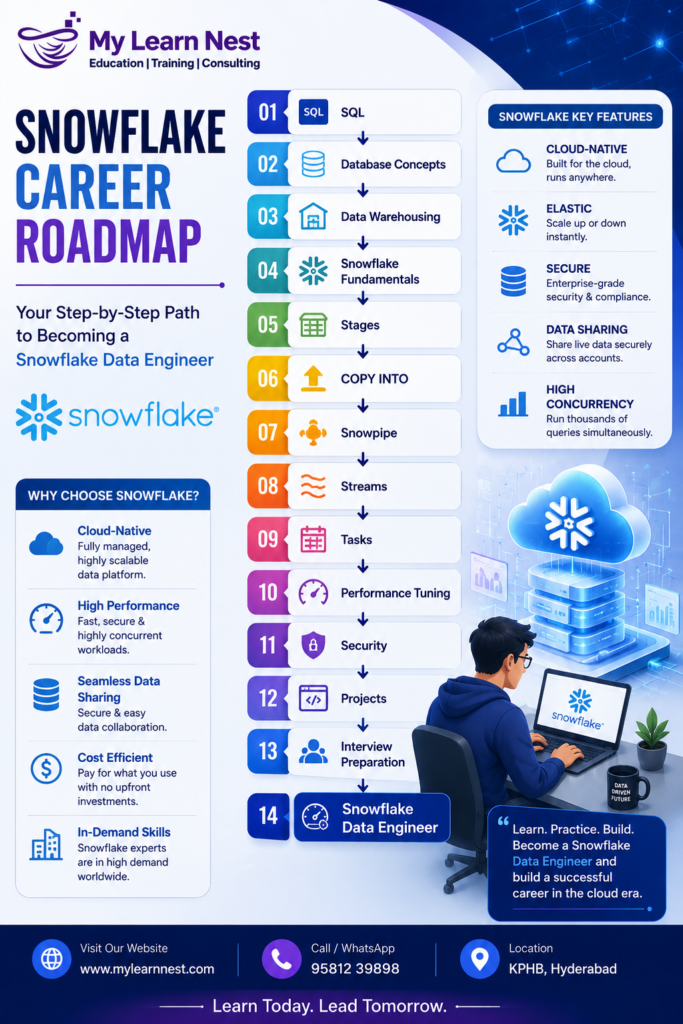
Snowflake Career Roadmap
Snowflake Career Opportunities for Experienced Professionals
Snowflake knowledge can support career growth across several technology roles.
Professionals can explore roles such as:
- Snowflake Data Engineer
- Snowflake Developer
- Cloud Data Engineer
- Data Engineer
- Data Warehouse Developer
- ETL Developer
- Analytics Engineer
- Data Architect
- Cloud Data Architect
- BI Developer
The exact responsibilities depend on the organization and job description.
Experienced candidates should focus on demonstrating how they have solved real business problems using data technologies.
Skills to Learn Along with Snowflake
Snowflake becomes even more valuable when combined with related technical skills.
Experienced professionals can consider learning:
- Advanced SQL
- Python
- Data modeling
- ETL and ELT
- Cloud platforms
- Cloud storage
- Apache Airflow
- dbt
- Git
- CI/CD
- Data visualization
- Data governance
- Data quality
- APIs
You do not need to learn everything at the same time. Focus on skills that match your target role.
Final Snowflake Interview Preparation Strategy
Before attending a Snowflake interview, review the fundamentals first.
Make sure you can explain Snowflake architecture in simple words. Understand the relationship between storage, compute, and cloud services.Next, revise SQL and data engineering concepts. Practice complex joins, window functions, CTEs, MERGE statements, and incremental loading.
Then focus on Snowflake-specific features such as Snowpipe, Streams, Tasks, Time Travel, Zero-Copy Cloning, data sharing, security, and performance optimization.
Be ready to answer questions such as:
- What was your project?
- What was the data source?
- How much data did you process?
- How did you load data?
- How did you implement incremental loading?
- How did you handle failures?
- How did you optimize performance?
- How did you reduce costs?
- What was your biggest technical challenge?
- What was your contribution to the project?
Your answers should be based on your actual experience. Avoid claiming technologies or responsibilities that you have not worked with.
Final Thoughts on Snowflake Interview Preparation
Preparing for a Snowflake interview as an experienced professional requires more than memorizing definitions.
Interviewers want to understand how you think, how you solve problems, and how you apply technology to real business requirements.
The 200 Snowflake interview questions and answers in this guide cover a wide range of topics, from architecture and SQL to data engineering, security, performance, migration, and real-world scenarios.
If you are preparing for a Snowflake interview, start with the fundamentals and then move toward advanced concepts. Practice explaining technical topics in simple language and connect every concept with a practical use case.
For experienced professionals, project knowledge is especially important. Be prepared to explain your architecture, data pipelines, challenges, performance improvements, and business impact.
If you are looking to strengthen your Snowflake skills through structured learning and practical training, MyLearnNest can help you build a focused learning path toward modern cloud data and data engineering careers.
Remember, the best interview preparation combines strong fundamentals, hands-on practice, real project understanding, SQL expertise, and confidence.
Keep learning, keep practicing, and keep improving your technical skills.
Learn Snowflake with MyLearnNest. Build practical skills. Prepare for real-world interviews. Move confidently toward your next data career opportunity.

