
Azure Fundamentals and Cloud Computing Concepts
Cloud computing has changed the way businesses build, manage, and scale their applications. Instead of purchasing and maintaining expensive physical servers, companies can use cloud platforms to access computing power, storage, databases, networking, security, and many other services over the internet.
Among the major cloud platforms, Microsoft Azure has become a popular choice for organizations of all sizes. It provides a large collection of cloud services that can be used for application development, data analytics, artificial intelligence, cybersecurity, virtual machines, storage, and enterprise workloads.
Understanding Azure fundamentals and cloud computing concepts is a good starting point for students, freshers, IT professionals, developers, administrators, and anyone planning to build a career in cloud computing.
This guide explains the important Azure fundamentals in simple language, including Azure services and regions, resource groups, subscriptions, Azure Portal, and the differences between Azure, AWS, and Google Cloud.
What Is Microsoft Azure?
Microsoft Azure is a cloud computing platform developed by Microsoft. It provides cloud-based services that allow individuals and organizations to build, deploy, manage, and scale applications without depending entirely on physical infrastructure.
Azure works through Microsoft’s global network of data centers. Customers can use Azure resources based on their business requirements and generally pay according to their usage and selected pricing model.
For example, a company that wants to host a web application does not necessarily need to purchase physical servers. It can create virtual machines, configure networking, store application data, and monitor the application using Azure services.
This makes Microsoft Azure fundamentals important for anyone interested in modern IT infrastructure and cloud-based technologies.
Why Is Microsoft Azure Important?
The growth of cloud computing has created a strong demand for professionals who understand cloud platforms. Microsoft Azure is particularly important because many organizations already use Microsoft technologies such as Windows Server, Microsoft 365, SQL Server, Active Directory, and other enterprise solutions.
Azure allows organizations to connect their existing technologies with cloud services.
Some common reasons businesses use Azure include:
- Flexible cloud infrastructure
- Scalable computing resources
- Data storage and backup
- Application hosting
- Database services
- Artificial intelligence and machine learning
- Security and identity management
- Data analytics
- Disaster recovery
The exact Azure services used by a company depend on its applications, data, security requirements, budget, and business goals.
Understanding Cloud Computing
Before learning Azure, it is useful to understand the basic concept of cloud computing.
Cloud computing means accessing computing resources through the internet instead of depending only on locally installed infrastructure.These resources can include servers, storage, databases, networking, software, analytics platforms, and development tools.
For example, when an organization needs additional computing capacity, it can provision cloud resources instead of purchasing a new physical server.
Cloud computing also makes it easier to increase or decrease resources based on demand. This flexibility is one of the major reasons organizations have moved many workloads to cloud platforms.
Types of Cloud Computing
Cloud computing is commonly discussed through different deployment models and service models.
The major deployment models are public cloud, private cloud, and hybrid cloud.
A public cloud provides cloud resources through a cloud provider’s infrastructure. Microsoft Azure, Amazon Web Services, and Google Cloud are examples of public cloud platforms.
A private cloud is designed for the use of a particular organization and may provide greater control over infrastructure and data.
A hybrid cloud combines private infrastructure with public cloud resources. Organizations can choose where particular workloads should run based on security, performance, compliance, and business requirements.
Cloud Service Models
Cloud services can also be divided into different service models.
Infrastructure as a Service (IaaS) provides fundamental infrastructure such as virtual machines, networking, and storage. Organizations have more control over the operating system and application environment.
Platform as a Service (PaaS) provides a managed platform for application development and deployment. Developers can focus more on applications while the cloud provider manages much of the underlying infrastructure.
Software as a Service (SaaS) provides ready-to-use software applications through the internet. Users generally do not need to manage the underlying servers or operating systems.
Understanding these concepts makes it easier to understand where different Azure services fit into cloud architecture.
Azure Services and Regions
One of the most important Azure fundamentals is understanding Azure services and regions.
Azure provides hundreds of cloud services for different technical and business requirements. Instead of purchasing a physical server and installing applications manually, organizations can select the Azure services they need and configure them through the Azure platform.
Azure services are hosted across Microsoft’s global infrastructure.
An Azure region represents a geographic area containing one or more Azure data centers. Organizations can select regions based on factors such as application users, data residency requirements, latency, compliance, and service availability.
For example, an application serving customers in India may choose an Azure region that provides suitable infrastructure and lower network latency for those users.
Understanding Azure Regions
Azure regions are an important part of designing reliable cloud applications.
When creating certain Azure resources, users may need to select a region. The selected region determines where the resource is hosted.
Organizations consider several factors when selecting an Azure region:
- Location of users
- Data residency requirements
- Regulatory requirements
- Service availability
- Network latency
- Disaster recovery requirements
- Cost considerations
Choosing the right region can affect application performance and architecture.
Azure Availability Zones
Availability Zones provide another important concept within Azure infrastructure.
An Azure region may contain multiple physically separate availability zones. These zones are designed to provide additional protection against failures within a region.
For applications that require higher availability, resources can sometimes be distributed across availability zones.
For example, instead of running an important application on infrastructure located in only one availability zone, an organization can design the application to use multiple zones where the relevant Azure services support that architecture.
This approach can improve resilience and reduce the impact of certain infrastructure failures.
What Are Azure Resource Groups?
An Azure Resource Group is a logical container used to organize and manage related Azure resources.
When working with Azure, organizations may create many resources such as virtual machines, storage accounts, databases, virtual networks, and application services. Managing each resource individually can become difficult. Resource groups help organize resources that belong to the same application, project, or environment.
For example, an organization developing an online shopping application might create a resource group containing resources related to that application.
A resource group can contain different types of Azure resources, depending on the architecture.
Why Are Azure Resource Groups Important?
Resource groups make Azure resource management easier.
They can be useful for organizing resources according to:
- Application
- Project
- Department
- Environment
- Business function
For example, a company could create separate resource groups for development, testing, and production environments.
Resource groups also play an important role in access management, monitoring, deployment, and resource lifecycle management.
When a project is no longer required, the associated resources can be reviewed and managed through their resource group.
Azure Resource Group Example
Imagine a company is creating a customer management application.
The application may require a web service, database, storage account, virtual network, and monitoring resources.Instead of keeping these resources unorganized, the company can place related resources into an appropriate resource group.
This creates a logical structure that makes the environment easier for administrators and developers to understand.
However, a resource group is not the same as a physical data center. It is primarily a logical management boundary.
What Is an Azure Subscription?
An Azure subscription is a logical account boundary used to access Azure services and manage resources, billing, and permissions.
A subscription can help an organization manage cloud usage and costs. Larger organizations may use multiple subscriptions to separate departments, projects, environments, or business units.
For example, an organization might have separate subscriptions for development and production workloads.
Subscriptions can also be associated with different access controls and billing arrangements.
Azure Subscription vs Resource Group
Azure subscriptions and resource groups are related but serve different purposes.
A subscription is a broader management and billing boundary. Resource groups are containers inside a subscription used to organize related resources.
For example, one Azure subscription may contain multiple resource groups.
A resource group might contain resources for a specific application, while another resource group contains resources for a different application.
Understanding this hierarchy is an important part of Azure fundamentals and cloud computing concepts.
Azure Resource Hierarchy
A simple way to understand Azure organization is to think about the relationship between management groups, subscriptions, resource groups, and resources.
At a high level, organizations may structure Azure environments like this:
Management Group → Subscription → Resource Group → Resources
A resource could be a virtual machine, storage account, database, web application, or networking component.
This hierarchy helps organizations manage large cloud environments in a structured way.
What Is Azure Portal?
The Azure Portal is a web-based interface used to create, configure, monitor, and manage Azure resources.
The portal provides access to different Azure services and management features.
A beginner learning Azure can use the portal to explore cloud services and understand how resources are created and configured.
For example, a user can use the Azure Portal to create a virtual machine, configure storage, manage users, monitor resources, and review billing information.
How Azure Portal Helps Beginners
The Azure Portal is useful for people who are new to cloud computing because it provides a visual interface.
Beginners can explore different services and understand how Azure resources are organized.
Typical activities include:
- Creating Azure resources
- Viewing existing resources
- Managing resource groups
- Checking resource status
- Configuring services
- Monitoring applications
- Reviewing costs
- Managing access permissions
Hands-on practice through the portal can make Azure fundamentals easier to understand.
Azure Portal and Azure CLI
The Azure Portal is not the only way to manage Azure resources.
Azure also provides command-line tools such as Azure CLI. Developers and administrators can use command-line commands to create and manage resources.
Infrastructure can also be managed through templates and automation tools.
For beginners, the Azure Portal can be a comfortable starting point because actions can be performed through a graphical interface. As learners gain experience, learning Azure CLI and infrastructure automation can help them work more efficiently.
Azure Services Beginners Should Know
Azure offers a very large collection of services, but beginners do not need to learn everything at once.
It is better to start with the major service categories.
Azure Virtual Machines provide virtualized computing environments.
Azure Blob Storage is used for storing large amounts of unstructured data such as documents, images, videos, and backups.
Azure Virtual Network provides networking capabilities for Azure resources.
Azure SQL Database provides a managed relational database service.
Azure App Service allows developers to host web applications and APIs.
Microsoft Entra ID provides identity and access management capabilities.
Learning these fundamental services gives beginners a strong base before moving into advanced Azure architecture.
Azure Compute Services
Compute services provide processing power for applications and workloads.Azure supports different computing approaches depending on the application’s requirements.
Virtual machines provide greater control over the operating system and environment. Managed application services can reduce the amount of infrastructure management required by developers.
Azure also provides serverless computing through services such as Azure Functions, where developers can execute code based on events without managing traditional servers.
Azure Storage Services
Cloud applications need reliable storage for application data, files, backups, logs, and other information.
Azure provides multiple storage services for different use cases.
Azure Blob Storage is commonly used for object storage. Other Azure storage options support file shares, queues, and tables. The correct storage service depends on the type of data, performance requirements, access patterns, availability needs, and application architecture.
Azure Database Services
Modern applications often depend on databases to store structured and unstructured information.
Azure provides managed database services that reduce the need for organizations to maintain database infrastructure manually.
Azure SQL Database is one example of a managed relational database service. Azure also supports other database technologies for different application requirements.
Using managed database services can help organizations reduce infrastructure administration while focusing more on application development and data management.
Azure Networking Fundamentals
Networking is another major part of Azure fundamentals.
Azure networking services allow resources to communicate with each other and with users or external systems.Important networking concepts include virtual networks, subnets, IP addresses, network security, routing, load balancing, and connectivity.
For example, a company may create a virtual network for its application and divide the network into different subnets for application and database components.
Understanding basic networking is extremely useful for Azure administrators, cloud engineers, DevOps professionals, and security specialists.
Azure Security and Identity
Security is a major consideration when moving workloads to the cloud.
Azure provides services and features for identity management, access control, monitoring, encryption, security management, and threat protection.Microsoft Entra ID is an important identity service within the Microsoft cloud ecosystem.
Organizations can use identity and access controls to determine who can access particular resources and what actions they are allowed to perform.
Azure Monitoring and Management
Cloud environments need continuous monitoring.
Azure provides monitoring capabilities that help organizations understand the health and performance of their applications and infrastructure.
Monitoring can help teams identify performance problems, availability issues, unusual activity, and resource usage. Azure Monitor is an important service for collecting and analyzing monitoring information from Azure resources and applications.
Monitoring is especially important in production environments because problems need to be detected and addressed quickly.
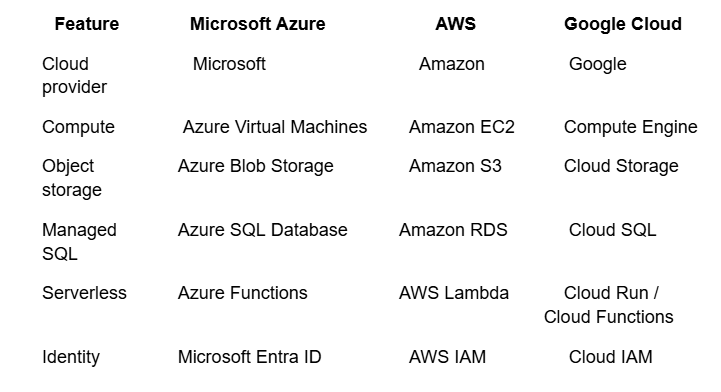
Azure vs AWS vs Google Cloud
Azure, Amazon Web Services, and Google Cloud are three major cloud computing platforms.
All three platforms provide computing, storage, networking, databases, security, analytics, artificial intelligence, and other cloud capabilities.
However, they differ in service names, ecosystem integrations, pricing approaches, tools, and areas where they have particular strengths.
The choice between Azure, AWS, and Google Cloud depends on the organization’s existing technology environment, technical requirements, budget, compliance requirements, team expertise, and business goals.
Microsoft Azure vs AWS
Microsoft Azure and Amazon Web Services are both widely used cloud platforms.
AWS has a very broad cloud service portfolio and has been a major player in cloud computing for many years.
Azure is particularly attractive to organizations that already use Microsoft technologies and enterprise products.Both platforms provide services for virtual machines, storage, databases, networking, security, containers, serverless computing, analytics, and machine learning.
For professionals, learning one major cloud platform can also make it easier to understand the concepts used by other cloud platforms.
Microsoft Azure vs Google Cloud
Google Cloud is another major cloud platform with strong capabilities in data analytics, artificial intelligence, machine learning, containers, and cloud infrastructure.
Azure has strong integration with Microsoft’s enterprise ecosystem.
Google Cloud is widely associated with Google’s technology ecosystem and data-focused services.
The best platform depends on the specific requirements of the organization rather than simply choosing a platform based on popularity.
Azure vs AWS vs Google Cloud Comparison
Which Cloud Platform Should Beginners Learn?
There is no single cloud platform that is perfect for everyone.
A beginner should consider their career goal and the technologies commonly used in the companies they want to work for.
Azure can be a strong choice for learners interested in Microsoft technologies, enterprise environments, cloud administration, DevOps, data engineering, cybersecurity, and application development.
AWS is also widely used across industries and provides a broad range of cloud services.Instead of trying to learn all three platforms at the beginning, it is generally better to build strong fundamentals in one platform first.
Benefits of Learning Azure Fundamentals
Learning Azure fundamentals and cloud computing concepts can help students and IT professionals understand how modern cloud infrastructure works.
Some major benefits include:
- Better understanding of cloud infrastructure
- Knowledge of Azure services
- Improved understanding of cloud security
- Foundation for Azure certifications
- Preparation for cloud-related jobs
- Better understanding of DevOps and data engineering
- Ability to work with cloud-hosted applications
Azure fundamentals can also provide a foundation for more advanced areas such as Azure administration, Azure DevOps, cloud security, data engineering, and cloud architecture.
Azure Career Opportunities
Cloud computing skills are useful across many IT roles.After learning Azure fundamentals, learners can gradually specialize in a particular career path.
Possible roles include:
Azure Administrator: Manages Azure resources, infrastructure, networking, security, and cloud environments.
Azure Developer: Builds and deploys applications using Azure services.
Cloud Engineer: Designs and manages cloud infrastructure and cloud-based solutions.
Azure DevOps Engineer: Works with development and operations teams to automate application development and deployment.
Cloud Security Engineer: Focuses on securing cloud infrastructure, identities, applications, and data.
Azure Data Engineer: Builds data pipelines and data solutions using Azure services.
The required skills and responsibilities vary depending on the company and job role.
Hands-On Azure Learning
Reading about Azure services is useful, but practical experience can make the concepts much easier to understand.
A beginner can practice creating a resource group, deploying a basic virtual machine, creating storage, configuring a virtual network, and monitoring resources.Learners can also build small cloud projects to understand how different services work together.
For example, a beginner project could involve hosting a simple web application and connecting it to a database and storage service.
Projects like these can help learners understand real-world cloud architecture instead of memorizing service definitions.
Common Azure Fundamentals Concepts to Remember
When starting your Azure journey, focus on understanding concepts rather than memorizing hundreds of service names.The most important concepts include Azure regions, availability zones, subscriptions, resource groups, Azure resources, identity, networking, storage, compute, security, monitoring, and pricing.
It is also important to understand how these components work together.
For example, an application may run on Azure compute resources, store data in an Azure database, use Azure storage for files, communicate through a virtual network, and use identity services to control access.
This broader understanding is more valuable than learning individual services in isolation.
How Azure Is Used in Real-World Businesses
Organizations use Azure for many different purposes.A retail company may use Azure to host an e-commerce application and analyze customer behavior.
A financial organization may use cloud services for data processing, reporting, application hosting, and disaster recovery.
A healthcare organization may use cloud infrastructure for applications, analytics, and data management while following applicable regulatory and security requirements.
These examples show why cloud skills are becoming relevant across many industries.
Azure Fundamentals Learning Roadmap
A beginner can follow a simple learning sequence instead of trying to learn every Azure service at once.
Start with cloud computing concepts and understand IaaS, PaaS, SaaS, public cloud, private cloud, and hybrid cloud.Then learn the Azure global infrastructure, regions, availability zones, subscriptions, resource groups, and Azure resources.
After that, focus on core services such as compute, storage, databases, networking, identity, and monitoring.Finally, start working on small projects and learn tools such as Azure CLI and infrastructure automation.
This approach creates a strong foundation for advanced Azure learning.
Why Azure Skills Matter in Modern IT
Cloud computing is now an important part of modern IT infrastructure.
Organizations want infrastructure that can scale with business requirements while providing reliable security, monitoring, and management capabilities.
Azure provides a broad ecosystem for achieving these goals.
For students and IT professionals, learning Azure fundamentals can therefore be a useful first step toward cloud-related career opportunities.The most important thing is to focus on practical understanding rather than simply memorizing Azure service definitions.
Conclusion
Azure Fundamentals and Cloud Computing Concepts provide the foundation needed to understand Microsoft’s cloud platform and modern cloud infrastructure. From Azure services and regions to subscriptions, resource groups, and the Azure Portal, these concepts help beginners understand how cloud resources are organized and managed.
Azure is not limited to virtual machines or storage. It provides services across computing, networking, databases, security, analytics, artificial intelligence, application development, and many other areas.
For students, freshers, and working IT professionals, starting with Azure fundamentals can be a practical way to build cloud knowledge and prepare for more advanced technologies.
The best way to learn is to combine theory with hands-on practice. Once the fundamentals are clear, learners can move toward specialized Azure skills and work on real-world cloud projects. This can create a strong foundation for a career in cloud computing and modern IT.

