
Azure Data Factory Roadmap for Beginners
Azure Data Factory (ADF) is Microsoft’s cloud-based data integration and ETL service. It helps organizations move and transform data between different sources and destinations and orchestrate workflows through pipelines. Microsoft describes ADF as a fully managed cloud service for data integration, with support for data movement, transformation, scheduling, and integration with other compute services.
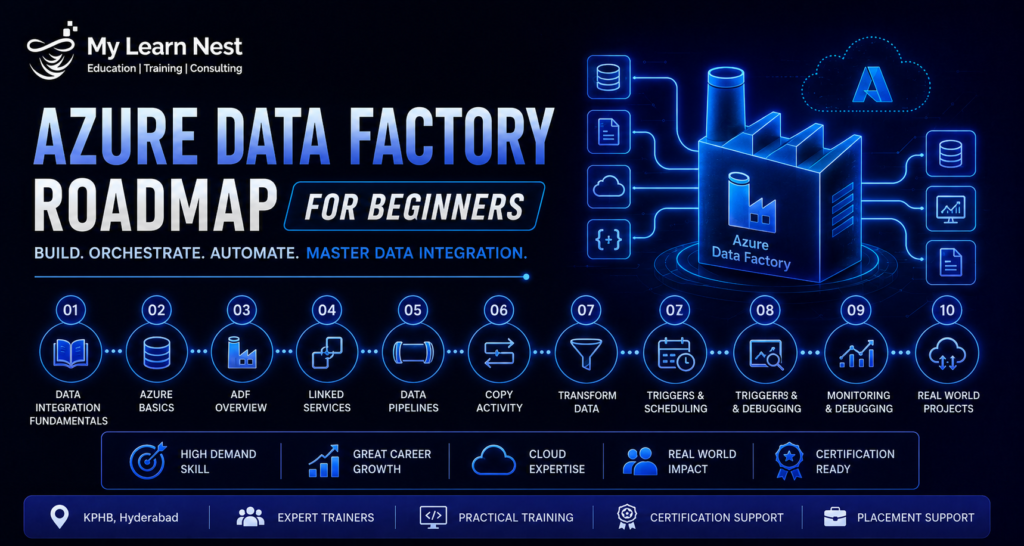
For beginners, the best Azure Data Factory roadmap starts with SQL and data-engineering concepts before moving into ADF components.
Learn SQL and Data Engineering Fundamentals
Start with SQL, databases, ETL versus ELT, data warehouses, data lakes, data modeling, batch processing, incremental loading, and data quality.
ADF is primarily an orchestration and data-integration platform, so understanding what happens to data before and after a pipeline is important.
Understand ADF Core Components
Learn the main ADF components: pipelines, activities, datasets, linked services, triggers, parameters, variables, and integration runtimes.
Microsoft’s beginner learning module specifically covers linked services, datasets, activities, pipelines, security, and integration runtime.
Learn Copy Activity
Copy Activity is one of the most important ADF features because it can move data between different data stores.Practice copying data from sources such as SQL Server or files into Azure Storage, Azure SQL, or other supported destinations.
Learn Mapping Data Flow
Mapping Data Flow provides a visual, code-free approach to transformation inside ADF. It is useful when you need transformations without writing all processing logic manually. Microsoft currently lists Mapping Data Flow among ADF’s transformation options.
Learn Triggers and Scheduling
Understand schedule triggers, event-based triggers, and how parameters can make pipelines reusable.A real project rarely runs a pipeline only once. Scheduling and automation are therefore essential ADF skills.
Learn Integration Runtime
Integration Runtime provides the compute infrastructure used by ADF for activities such as data movement and data transformation and can support different network environments.
Beginners should understand the difference between Azure Integration Runtime and Self-hosted Integration Runtime and when a self-hosted environment is required.
Learn Monitoring and Troubleshooting
Learn how to monitor pipeline runs, identify failed activities, inspect errors, retry jobs, and trace data movement.Microsoft’s current ADF tutorials include troubleshooting pipelines as part of its core learning resources.
Learn Git and Deployment
For professional projects, understand source control, environments, CI/CD, ARM or infrastructure-related deployment concepts, and how ADF resources move between development, testing, and production.
Build Projects
Once the fundamentals are clear, build end-to-end projects involving SQL, files, Azure Storage, ADF pipelines, transformations, monitoring, and reporting.
A practical learning sequence is:
SQL → ETL Concepts → ADF Fundamentals → Pipelines → Copy Activity → Data Flow → Triggers → Integration Runtime → Monitoring → Deployment → Real-Time Projects
ADF Real-Time Projects
Real-time projects are important because ADF is primarily used as part of complete data architectures rather than as an isolated tool.
Retail Sales ETL Project
A retail company receives daily sales data from CSV files and a SQL database.
ADF can ingest the source data into Azure Data Lake or another staging layer, transform it, and load the cleaned information into a reporting database.The business output can include daily sales, product performance, store-wise revenue, and monthly trends.
Customer Data Integration Project
Suppose customer information exists in multiple systems.ADF can bring data from SQL Server, APIs, and files into a centralized data platform. The pipeline can standardize customer records and prepare a trusted dataset for reporting.
This project is useful for learning multiple linked services, parameterized pipelines, and data quality checks.
Incremental Load Project
A common enterprise requirement is to load only newly created or modified records instead of processing the entire source table each day.
Build a pipeline that uses a watermark such as a timestamp or increasing ID to identify new records.This is an important scenario because incremental loading can reduce processing time and unnecessary data movement.
On-Premises to Azure Migration Project
Create a project that moves data from an on-premises SQL Server environment into Azure.
ADF’s self-hosted integration runtime can be used when data movement needs access to on-premises resources. Microsoft documents integration runtime as the infrastructure that enables data movement across different network environments.
ADF and Databricks Project
ADF can orchestrate transformations that run in Azure Databricks. Microsoft provides an ADF tutorial pattern where a pipeline performs validation, copies data, and then runs a Databricks notebook.
This is a strong project for learners because it demonstrates that ADF can act as the orchestration layer while Databricks handles more complex processing.
ADF Project Architecture
A practical architecture could look like:
Source Systems → ADF → Data Lake/Staging → Transformation → Data Warehouse → Power BI
The technologies can change according to the business requirement, but the important skill is understanding the movement and transformation of data through the architecture.
ADF Interview Questions & Scenario-Based Answers
ADF interviews usually test both platform knowledge and practical troubleshooting.
What Is Azure Data Factory?
Azure Data Factory is a managed cloud data-integration service used to move and transform data and orchestrate workflows between data sources and destinations.
What Is a Pipeline in ADF?
A pipeline is a logical grouping of activities that defines a workflow.
For example:
Extract → Transform → Load → Validate
What Is a Linked Service?
A linked service stores connection information needed to connect ADF to an external data store or compute environment.
What Is a Dataset?
A dataset represents the structure or location of the data that an activity works with.
What Is Integration Runtime?
Integration Runtime is the compute infrastructure used by ADF for data movement and other integration operations. It can support cloud and on-premises scenarios.
Scenario: A Pipeline Is Failing Suddenly
First identify the failed activity and inspect the error message.
Then verify source availability, credentials, integration runtime status, network access, parameters, schema changes, and recent modifications.The important interview point is to demonstrate a structured troubleshooting process rather than immediately rerunning the pipeline.
Scenario: The Pipeline Is Taking Too Long
Start by identifying the slow activity.
Check source performance, data volume, parallelism, transformations, network movement, partitioning, and integration-runtime resources.Do not assume the entire pipeline needs more compute. Identify the actual bottleneck first.
Scenario: Duplicate Records Are Loaded
Investigate the incremental-load logic, business keys, source duplicates, joins, and pipeline retry behavior.
A good solution should prevent the cause rather than simply deleting duplicate records afterward.
Scenario: Source Schema Has Changed
Check whether the new source schema affects mappings, transformations, and destination tables.
Schema changes should be managed through controlled testing and deployment rather than allowing unexpected changes to silently reach production.
Scenario: You Need to Load Only New Records
Use an incremental-load strategy based on a suitable watermark column, timestamp, change tracking mechanism, or other supported source-side approach.
The exact method depends on the source system and business requirements.
Scenario: ADF Must Access an On-Premises Database
Use an appropriate self-hosted integration runtime when the environment requires access to on-premises resources.
Microsoft’s integration-runtime documentation specifically describes its role in moving data across public and private network environments.
Scenario: A Databricks Notebook Must Run After Data Ingestion
ADF can orchestrate the sequence by first performing validation or copying the data and then triggering the Databricks notebook activity. Microsoft provides this type of end-to-end pattern in its ADF documentation.
ADF vs Databricks
ADF and Azure Databricks are often compared, but they serve different primary purposes.
Azure Data Factory is mainly focused on data integration, movement, orchestration, scheduling, and workflow management.
Azure Databricks is primarily a data and AI processing platform built around Apache Spark and can be used for large-scale transformations, analytics, machine learning, and advanced data processing.
Microsoft’s ADF documentation explicitly supports Databricks as an external compute service for transformations, which shows how the two technologies can work together instead of replacing one another.
When Should You Use ADF?
ADF is a good fit when the main requirement is to connect data sources, orchestrate jobs, schedule workflows, manage dependencies, and move data between systems.
When Should You Use Databricks?
Databricks is more suitable when the workload requires complex transformations, Spark processing, advanced analytics, machine learning, or large-scale data processing.
Can ADF and Databricks Be Used Together?
Yes. This is a common architecture.
ADF → Ingest Data → Trigger Databricks → Transform Data → Store Results
ADF handles orchestration while Databricks handles processing.
Area | Azure Data Factory | Azure Databricks |
Main role | Data integration and orchestration | Data processing and analytics |
Pipelines | Core capability | Can be orchestrated externally |
Data movement | Strong | Not the primary purpose |
Complex transformations | Possible | Strong |
Spark | External integration | Core technology |
Scheduling | Strong | Available through workflows |
Best use | ETL/ELT orchestration | Large-scale processing and analytics |
ADF vs SSIS
ADF and SSIS both support data integration, but they are designed for different environments.
SSIS (SQL Server Integration Services) is a traditional Microsoft ETL platform that has been widely used for on-premises SQL Server data integration.
ADF is Microsoft’s cloud-first data integration platform.
Microsoft’s current architecture guidance compares ADF and SSIS as different pipeline-orchestration options. ADF is managed and cloud-based, while traditional SSIS is not cloud-native.
ADF for Cloud Data Integration
ADF is suitable for organizations building cloud-based pipelines across Azure and other data systems.
It can work with cloud and on-premises sources and can orchestrate external compute services.
SSIS for Existing Enterprise ETL
SSIS remains relevant when an organization has a significant investment in existing SSIS packages.
Microsoft provides an Azure-SSIS Integration Runtime that allows organizations to run SSIS packages within ADF, which can help during cloud migration.
For organizations modernizing legacy ETL, ADF can coexist with SSIS during a gradual migration rather than requiring everything to be rewritten immediately.
How to Build ETL Pipelines Using ADF
Building an ETL pipeline in ADF means extracting data from a source, transforming it according to business requirements, and loading the resulting information into a target.
Microsoft’s introductory ADF material follows this same basic model by teaching users to create linked services, datasets, activities, pipelines, and integration runtimes.
Step 1: Identify the Source and Target
First determine where the data originates and where it needs to go.
For example:
SQL Server → Azure Data Lake → Azure SQL Database
Understanding the source and target determines the type of connections and pipeline activities you need.
Step 2: Create Linked Services
Create connections for the source and destination systems.
These connections allow ADF to communicate with external data stores.
Step 3: Define Datasets
Create datasets that describe the source and target data.
For file-based data, parameters can be used to make the pipeline reusable across multiple files or folders.
Step 4: Create the Pipeline
Create a pipeline and add the required activities.
A basic ETL pipeline may contain:
Lookup → Copy Data → Transformation → Stored Procedure → Validation
The exact activities depend on the business requirement.
Step 5: Add Transformations
For simple transformations, Mapping Data Flow may be appropriate. For complex processing, ADF can orchestrate external compute such as Azure Databricks. Microsoft lists both Mapping Data Flow and Databricks activities among current ADF transformation options.
Step 6: Add Parameters and Variables
Parameters make pipelines reusable.
For example, one pipeline can accept a source table name or file path rather than requiring a separate pipeline for every table.
Step 7: Add a Trigger
Decide when the pipeline should run.
It may run on a schedule, after an event, or as part of another workflow.
Step 8: Test and Monitor
Run the pipeline with sample data and check the output.
Use monitoring to investigate failures, performance issues, and unexpected results.
Step 9: Deploy Through Environments
Use development, testing, and production environments rather than modifying production directly.
This makes changes easier to control and reduces operational risk.
ADF Developer Salary in India
ADF Developers are often hired under broader titles such as Azure Data Engineer, Data Engineer, ETL Developer, Azure Developer, or Azure Data Factory Developer. Salary therefore varies depending on the overall role and technology stack.
Current AmbitionBox data for Azure Data Factory Developers in Hyderabad/Secunderabad reports an annual salary range of approximately ₹4.2 lakh to ₹14 lakh, based on 79 salaries and covering professionals with roughly 2–6 years of experience.
Glassdoor’s India data for Azure Data Factory Developers shows a reported average base pay of about ₹9 lakh per year, with a reported range of ₹7 lakh–₹10.5 lakh, although the dataset is marked low confidence because it is based on only two submitted salaries.A Glassdoor listing also shows a Hyderabad submission for an Azure Data Factory Developer with 4–6 years of experience at approximately ₹10 lakh–₹11 lakh per year.
These figures should be viewed as market indicators rather than fixed salary guarantees.
ADF Developer Salary for Freshers
Freshers may enter through junior data-engineering, ETL, Azure support, or trainee roles. The package depends on the employer and the broader skills required by the job.
Strong SQL, Azure fundamentals, ADF, data warehousing, and project experience can help a beginner build a stronger profile.
ADF Developer Salary for Experienced Professionals
Experienced ADF professionals can move toward roles such as Azure Data Engineer, Senior Data Engineer, Data Integration Developer, Cloud Data Engineer, or Data Architect.
Learning ADF + SQL + Azure Data Lake + Databricks + Python/PySpark can create a broader profile than learning ADF alone.
What Influences ADF Developer Salary?
Salary depends on experience, project complexity, cloud skills, data-engineering knowledge, Databricks exposure, SQL, Python, architecture skills, communication, and employer.
ADF is best viewed as one component of a broader Azure Data Engineering skill set.
ADF Career Opportunities in 2026
ADF remains relevant to organizations that need cloud data integration and workflow orchestration. Current Microsoft documentation continues to position Azure Data Factory as a managed service for data movement, transformation, workflow orchestration, and integration with services such as Databricks and SSIS.
At the same time, Microsoft now describes Data Factory in Microsoft Fabric as the next generation of Azure Data Factory, while existing ADF workloads continue to be supported. This means learners should understand traditional ADF skills while keeping an eye on Microsoft’s broader Fabric data-integration direction.
Potential career paths include:
ADF Developer → Azure Data Engineer → Senior Data Engineer → Data Engineering Lead → Cloud Data Architect
Learning ADF alone is useful, but learning it together with broader data-engineering technologies creates more career flexibility.
Why Learn Azure Data Factory With MyLearnNest?
ADF training should focus on complete data workflows rather than teaching only the interface.
MyLearnNest can structure ADF training around ADF fundamentals, SQL, pipelines, Copy Activity, Mapping Data Flow, integration runtime, incremental loading, ETL/ELT, Databricks integration, monitoring, real-time projects, scenario-based interview preparation, and career guidance.
The most valuable approach is to help learners understand a business problem, design the pipeline, connect the source and destination, transform the data, monitor the workflow, troubleshoot failures, and explain the solution in an interview.
Final Thoughts on Azure Data Factory
Azure Data Factory is an important skill for professionals entering Azure Data Engineering and cloud data integration.
The practical learning path is:
SQL → ETL Concepts → ADF Fundamentals → Pipelines → Copy Activity → Data Flow → Triggers → Integration Runtime → Monitoring → Databricks Integration → Real-Time Projects → Interview Preparation
ADF should not be treated as an isolated technology. Combine it with SQL, Azure Data Lake, Databricks, Python/PySpark, data modeling, and cloud fundamentals to build a stronger data-engineering profile.

