
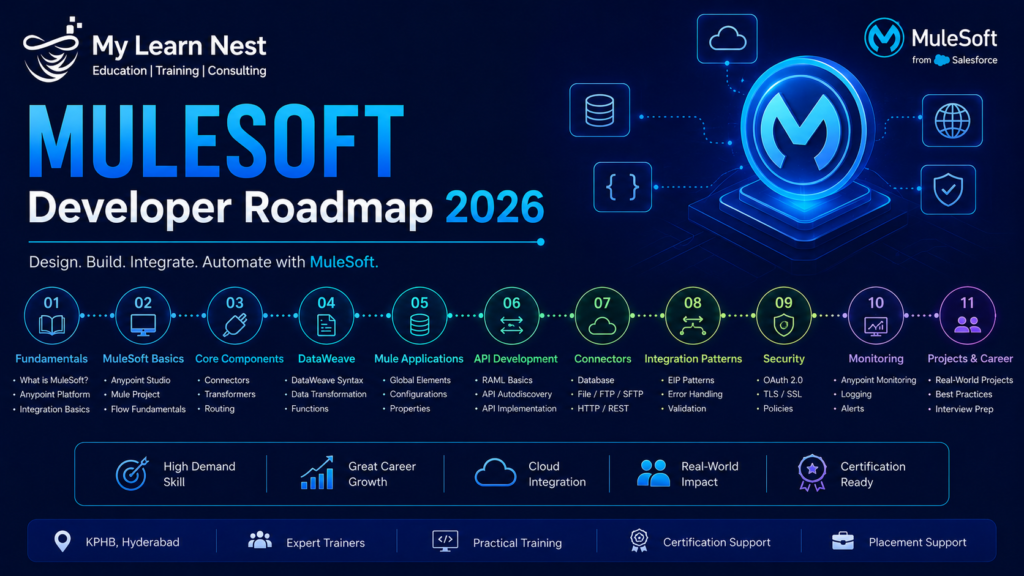
MuleSoft Developer Roadmap 2026
MuleSoft is an integration and API platform used to connect applications, data, devices, and business systems. Its Anypoint Platform supports API development, integration, API management, deployment, monitoring, and governance. MuleSoft’s current developer ecosystem also includes APIs, SDKs, Anypoint Code Builder, and resources for building integrations and connected applications.
A MuleSoft Developer roadmap in 2026 should start with programming and integration fundamentals before moving into Anypoint Platform, Mule applications, DataWeave, API-led connectivity, deployment, and real-time projects.
Learn Java Fundamentals
Java is useful for understanding the programming concepts behind MuleSoft development, although Mule applications are generally created through Mule configuration and DataWeave rather than conventional Java application development.
Understand variables, methods, classes, exceptions, collections, and basic object-oriented programming.
Learn APIs and Integration Concepts
Before learning MuleSoft, understand REST APIs, HTTP methods, JSON, XML, authentication, web services, databases, queues, and system integration.
A MuleSoft Developer should understand how one application communicates with another and how data is transformed between systems.
Learn Anypoint Platform
Become familiar with Anypoint Studio, Anypoint Code Builder, API Manager, Runtime Manager, Exchange, Design Center, and related platform capabilities.
The purpose is to understand the complete development lifecycle:
Design → Develop → Test → Deploy → Manage → Monitor
Learn Mule 4 and DataWeave
Mule 4 is central to modern MuleSoft development. Learn flows, subflows, event processing, connectors, error handling, scopes, variables, and routing.
DataWeave is particularly important because it is used for transforming data between formats and structures.
Learn API-Led Connectivity
Understand the idea of reusable APIs and the common API-led structure of System APIs, Process APIs, and Experience APIs.
The goal is to create reusable integration assets instead of building isolated point-to-point connections for every business requirement.
Learn Connectors and Integration Patterns
Practice common connectors and patterns for databases, HTTP services, Salesforce, files, messaging systems, and other enterprise applications. You should understand when to use synchronous APIs, asynchronous messaging, batch processing, and scheduled integrations.
Learn Deployment and Monitoring
Learn how Mule applications are deployed and monitored through Anypoint Platform, including environments, properties, logs, application status, and troubleshooting.
Build Real-Time Projects
Finish the roadmap by building end-to-end integrations.
A practical sequence is:
Java Basics → APIs → REST/HTTP → Anypoint Platform → Mule 4 → DataWeave → Connectors → API-Led Connectivity → Error Handling → Deployment → Monitoring → Projects → Certification
MuleSoft’s current developer resources continue to provide documentation and tooling for APIs, integrations, and developer workflows.
How to Become a MuleSoft Developer
Becoming a MuleSoft Developer requires a combination of software fundamentals and integration knowledge. You do not need to become an expert in every enterprise application, but you should understand how systems communicate and how integration solutions are designed.
Start With Integration Fundamentals
Learn how applications exchange data through REST APIs, HTTP, JSON, XML, databases, queues, and web services.
For example, understand the difference between sending a GET request to retrieve information and a POST request to create information before trying to build MuleSoft integrations.
Learn MuleSoft Development Tools
Practice with Anypoint Studio or the current Anypoint development tooling. Learn how flows are created, how connectors are configured, how events move through a flow, and how errors are handled.
Learn DataWeave Properly
Data transformation is one of the most important MuleSoft development skills.
Practice converting JSON to XML, XML to JSON, mapping fields, filtering arrays, combining data, handling null values, and transforming database responses into API responses.
Learn Error Handling
Production integrations must handle failures.
Understand the difference between expected and unexpected errors, error types, retry strategies, logging, and how errors should be returned to calling applications.
Learn API Design
Understand API resources, methods, parameters, responses, security, versioning, and documentation.
API design is important because MuleSoft is not only an integration tool; it is also an API management and application-network platform.
Build Projects
A strong beginner portfolio can include a REST API, database integration, Salesforce integration, file-processing pipeline, and a multi-system business workflow.
For every project, explain the source systems, target systems, integration logic, transformations, error handling, and deployment approach.
Add Certification
MuleSoft’s current Salesforce partner material identifies MuleSoft Certified Developer Level 1 as a credential covering the design, build, testing, debugging, deployment, and management of basic APIs and integrations using Anypoint Platform. It also identifies Level 2 for experienced developers working on more complex API-led integration solutions.
Certification should support practical development rather than replace project experience.
MuleSoft Developer Salary in India
MuleSoft Developer salaries in India vary according to experience, employer, location, integration skills, Salesforce knowledge, project complexity, and technical specialization.
Current Glassdoor data reports a median total pay of approximately ₹6.5 lakh per year for MuleSoft Developers in India, with a reported total-pay range of around ₹4.98 lakh to ₹10 lakh per year. The same source reports base pay around ₹4.8 lakh–₹9 lakh.
Another current Glassdoor India dataset reports average base pay of about ₹6 lakh per year, with a ₹5 lakh–₹9 lakh base-pay range and approximately ₹50,000 average additional pay.
Recent salary submissions also show substantial variation by experience and company. For example, the same dataset contains a Hyderabad submission of ₹5 lakh for a professional with 1–3 years of experience and submissions of ₹8 lakh and ₹18 lakh for professionals with 4–6 years of experience.
These numbers are market indicators and should not be treated as fixed salary bands.
MuleSoft Developer Salary for Freshers
Freshers may enter through junior integration, application-development, support, or trainee roles.
Strong API knowledge, Java basics, DataWeave, SQL, and hands-on MuleSoft projects can help create a more relevant profile.
MuleSoft Developer Salary for Experienced Professionals
Experienced professionals can progress toward senior developer, integration lead, technical consultant, MuleSoft architect, or API architect roles.
The ability to design reusable integrations, troubleshoot production systems, optimize performance, and communicate with clients can have a major influence on career progression.
Skills That Can Improve MuleSoft Career Growth
A developer can strengthen their profile by combining MuleSoft with APIs, Salesforce, Java, SQL, cloud platforms, DevOps, CI/CD, security, and enterprise integration patterns.
Current developer discussions also show that project experience remains important even after certification. A Salesforce community response in November 2025 specifically emphasized demonstrating real integration work rather than relying on certification alone.
MuleSoft Real-Time Projects
Real-time MuleSoft projects should show how different business systems communicate through APIs and integration flows.
Salesforce and ERP Integration
A company wants Salesforce customer information to interact with an ERP system.
A MuleSoft solution can expose reusable APIs and transform data between the two systems.
A simplified architecture can be:
Salesforce → Experience/API Layer → Process API → ERP
This project demonstrates API-led connectivity, data transformation, authentication, and error handling.
Employee Data Integration Project
An organization stores employee information in an HR system but needs selected employee information available in another application.
MuleSoft can retrieve the source data, transform it into the target structure, validate required fields, and send it to the destination.
E-Commerce Order Integration
An e-commerce application receives an order and needs to send information to inventory, payment, and shipping systems.
MuleSoft can orchestrate the required integrations and provide a consistent API layer between these systems.
The project can demonstrate synchronous APIs, error handling, transformation, and business orchestration.
File-to-API Integration
Suppose a business receives CSV files from a partner every day but needs that information exposed through an API.
A MuleSoft application can read the file, transform the records using DataWeave, validate the data, and expose the processed information through a REST API.
Database-to-API Project
Build an API that retrieves customer or product information from a database.
The MuleSoft flow can:
API Request → Database Query → DataWeave Transformation → JSON Response
This is an excellent beginner project because it covers APIs, SQL, connectors, DataWeave, and error handling.
Real-Time Notification Integration
Create a workflow where a business event triggers communication with another application.
For example:
Order Created → MuleSoft → Validation → Notification Service → Response
This demonstrates event-based integration concepts.
How to Explain a MuleSoft Project in an Interview
Use a simple structure:
Business Problem → Source Systems → Target Systems → API Design → MuleSoft Components → DataWeave Transformation → Error Handling → Testing → Deployment → Result
Your explanation should make your individual contribution clear.
MuleSoft vs Boomi
MuleSoft and Boomi are both integration platforms, but they emphasize different development approaches.
MuleSoft’s Anypoint Platform is strongly oriented toward API-led connectivity, reusable APIs, complex enterprise integrations, and developer-centric development. Boomi emphasizes a low-code integration approach designed to simplify development and automation. These descriptions come from the vendors themselves, so they should be treated as product positioning rather than an independent benchmark.
MuleSoft
MuleSoft is a strong fit when an organization needs reusable APIs, complex transformations, governance, and extensive enterprise integration patterns.
The platform provides Anypoint Studio, DataWeave, API management, connectors, runtime management, and other capabilities for enterprise integration.
Boomi
Boomi emphasizes low-code integration and orchestration. Its platform provides a visual approach that can make certain integrations faster to develop, particularly where low-code development is a priority.
Which Platform Should You Choose?
The answer depends on the organization’s requirements.
MuleSoft may be attractive when API-led architecture, reusable integration assets, developer control, and complex enterprise connectivity are priorities.
Boomi can be attractive when an organization emphasizes low-code development, speed, and simpler integration workflows.
MuleSoft vs Boomi Comparison
Area | MuleSoft | Boomi |
Main approach | API-led, developer-centric | Low-code integration |
API management | Strong | Strong |
Complex integrations | Strong | Strong |
Development style | More pro-code | More low-code |
Data transformation | DataWeave | Visual transformation capabilities |
Best fit | Reusable enterprise APIs and complex integration | Fast low-code integration and automation |
Career specialization | MuleSoft Developer / Architect | Boomi Developer / Integration Specialist |
Both vendors make strong claims about their respective strengths, so organizations should evaluate actual workloads, skills, architecture, governance, cost, and integration requirements before choosing a platform.
MuleSoft Certification Roadmap
MuleSoft certifications can help demonstrate knowledge of Anypoint Platform and integration development.
MuleSoft Certified Developer Level 1
MuleSoft Certified Developer Level 1 is a common starting point for developers. Salesforce’s current MuleSoft partner material describes it as validating the ability to design, build, test, debug, deploy, and manage basic APIs and integrations, with emphasis on integration concepts, data transformation, and event-driven architecture.
MuleSoft also provides developer-learning resources around Anypoint Platform Development Fundamentals, APIs, DataWeave, Anypoint Studio, and related skills.
MuleSoft Certified Developer Level 2
Level 2 is intended for more experienced developers. Salesforce’s current partner guide describes it as focused on independently designing, building, testing, and deploying complex API-led integration solutions, including advanced use cases, reusable components, error handling, and performance optimization.
Architecture and Platform Skills
After gaining development experience, professionals can expand into architecture, API management, deployment, and platform operations.
MuleSoft’s own training guidance has historically positioned Application Networks, CloudHub, API Management, and production-ready development as useful learning areas alongside Developer Level 1.
Practical MuleSoft Certification Roadmap
A useful learning sequence is:
Anypoint Platform Fundamentals → Mule 4 Development → DataWeave → MCD Level 1 → Real-Time Projects → Advanced Development → MCD Level 2 → Architecture/Platform Specialization
Certification requirements and current exam structures can change, so candidates should confirm the latest details through Salesforce/MuleSoft before registering.
MuleSoft Interview Questions
MuleSoft interviews commonly test Mule 4 fundamentals, DataWeave, APIs, integration patterns, error handling, deployment, and real project experience.
What Is MuleSoft?
MuleSoft is an integration and API platform used to connect applications, data, and devices and create reusable integration services.
What Is Anypoint Platform?
Anypoint Platform is the broader MuleSoft platform covering API design, development, management, deployment, monitoring, and integration capabilities.
What Is Mule 4?
Mule 4 is the runtime and development model used for modern Mule applications. Developers build flows and integrations using Mule configuration, connectors, processors, DataWeave, and related Anypoint tools.
What Is DataWeave?
DataWeave is MuleSoft’s language for transforming and manipulating data. It is commonly used to convert formats and map source data structures to target structures.
What Is API-Led Connectivity?
API-led connectivity is an approach to designing reusable APIs around systems, business processes, and user experiences.
A common model is:
System APIs → Process APIs → Experience APIs
What Is a Mule Event?
A Mule event represents the information processed through a Mule application, including the message payload and related attributes.
Understanding how data changes as it travels through a flow is fundamental to MuleSoft development.
What Is the Difference Between a Flow and a Subflow?
A flow generally has its own processing and error-handling behavior and can be triggered by an event source.
A subflow is commonly used for reusable processing logic called from other flows.
What Is Error Handling in MuleSoft?
Error handling defines what happens when an operation fails.
A developer can handle expected errors, log useful information, transform error responses, retry appropriate operations, or propagate an error according to the business requirement.
How Would You Handle a Slow API?
First identify where the time is being spent.
Check the source system, network, database queries, transformations, downstream APIs, payload size, and Mule application processing. Then optimize the actual bottleneck instead of simply increasing resources.
How Would You Handle a Failed Database Connection?
Check the database availability, credentials, network connectivity, connection configuration, connection pool, and error logs.
Then validate the connection independently and determine whether the failure is temporary or caused by configuration or infrastructure.
How Would You Design a Salesforce-to-ERP Integration?
Start with the business requirement and data flow. Design reusable APIs, define source and target data models, implement required transformations with DataWeave, configure authentication, handle errors, and test both normal and failure scenarios.
What Is the Difference Between Synchronous and Asynchronous Integration?
Synchronous integration waits for a response during the request. Asynchronous integration allows processing to continue independently, often using messaging or event-driven patterns.
The appropriate choice depends on latency, reliability, coupling, and business requirements.
How Would You Explain Your MuleSoft Project?
Explain the business problem first, followed by the source and target systems, API architecture, Mule flows, DataWeave transformations, error handling, security, deployment, testing, and your personal responsibilities.
How Do You Troubleshoot a MuleSoft Application?
Start with the error message and application logs. Trace the request through the flow, identify the failed processor or connector, validate the input and configuration, reproduce the issue where possible, and then fix and retest the specific root cause.
MuleSoft Career Opportunities in 2026
MuleSoft careers are available across application integration, API development, enterprise integration, Salesforce integration, API management, technical consulting, and architecture.
Common roles include MuleSoft Developer, MuleSoft Integration Developer, API Developer, MuleSoft Consultant, Senior MuleSoft Developer, Integration Architect, API Architect, and MuleSoft Technical Lead.
MuleSoft’s developer ecosystem is also evolving with AI-assisted development. Current Developer Hub release notes describe a unified experience for discovering and working with APIs, skills, MCP servers, and Terraform, including support for AI-agent-related workflows. This means MuleSoft professionals should increasingly understand APIs, integrations, automation, cloud deployment, and AI-related integration patterns rather than focusing only on traditional point-to-point interfaces.
Why Learn MuleSoft With MyLearnNest?
MuleSoft training should combine integration concepts with hands-on development.
MyLearnNest can structure MuleSoft training around Anypoint Platform, Mule 4, DataWeave, REST APIs, API-led connectivity, connectors, error handling, Salesforce integration, deployment, monitoring, real-time projects, certification preparation, and interview scenarios.
The most useful training approach is project-oriented. Learners should understand a business problem, identify the systems involved, design the API architecture, build the integration, transform the data, handle errors, test the application, and explain the final solution.
Final Thoughts on MuleSoft Careers in 2026
MuleSoft can be a strong career option for professionals interested in APIs, enterprise integration, cloud applications, Salesforce, automation, and digital transformation.
The practical learning path is:
Java Basics → API Fundamentals → Anypoint Platform → Mule 4 → DataWeave → Connectors → API-Led Connectivity → Error Handling → Deployment → Real-Time Projects → Certification → Interview Preparation
The current Indian market data shows MuleSoft Developer compensation around a ₹6 lakh average base salary, while actual salaries vary significantly by experience, location, and employer. Recent Hyderabad salary submissions demonstrate that variation clearly.

