
Snowflake Architecture and Data Warehouse Concepts Explained
Snowflake has become one of the most popular cloud data platforms for organizations that need scalable, secure, and flexible data management. Unlike traditional data warehouses, Snowflake was designed specifically for the cloud. Its architecture separates data storage from computing, allowing organizations to store large amounts of data while using computing resources only when they are required.
Understanding Snowflake architecture is important for anyone planning to build a career in data engineering, cloud computing, business intelligence, or analytics. It also helps professionals understand how Snowflake manages data, processes queries, supports data sharing, and handles large workloads.
Snowflake is commonly used for data warehousing, data engineering, data analytics, ETL, ELT, cloud data integration, and business intelligence. Its architecture makes it possible for multiple teams to work with the same data without creating unnecessary copies or affecting each other’s workloads.
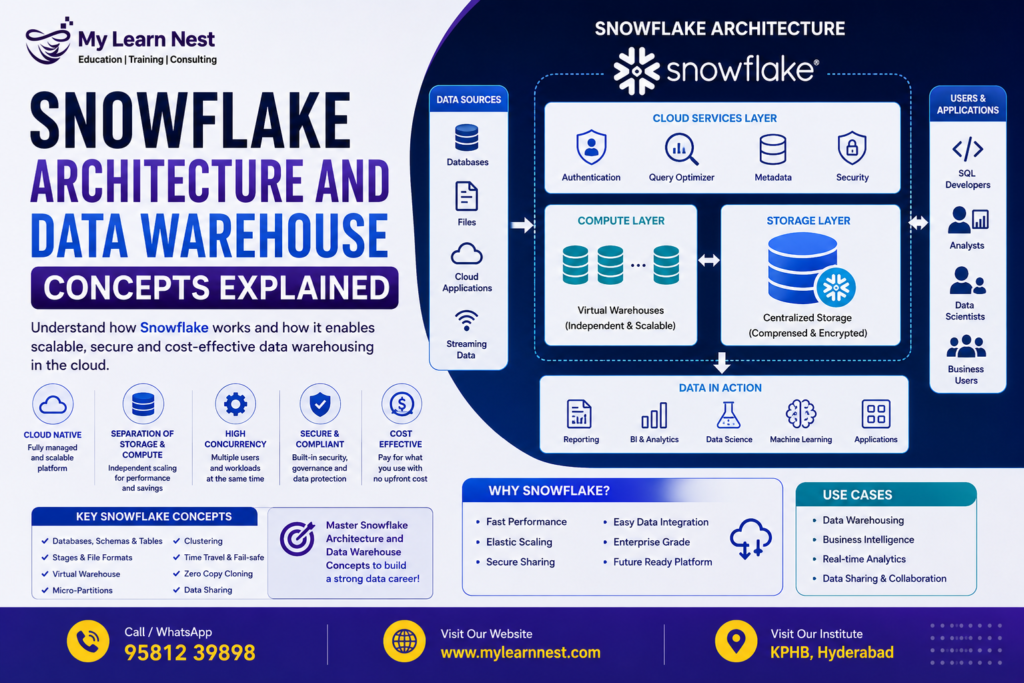
The Snowflake architecture can be broadly understood through three major layers:
- Storage layer
- Compute layer
- Cloud Services layer
These layers work together to provide a highly scalable cloud data warehouse environment.
What Is Snowflake Architecture?
Snowflake architecture refers to the way Snowflake organizes storage, computing, query processing, security, metadata, and other data management services.
The biggest difference between Snowflake and many traditional data warehouse systems is the separation of storage and compute. In older architectures, storage and computing resources were often closely connected. Increasing one could require increasing the other.
Snowflake takes a different approach.
Data is stored centrally in Snowflake’s storage layer, while computing is handled through independent virtual warehouses. This allows different users, departments, or applications to access the same data using separate compute resources.
For example, a company may have one team running business reports while another team is performing data transformation jobs. Instead of both workloads competing for the same computing resources, Snowflake can use separate virtual warehouses.
This architecture provides flexibility, scalability, and better workload management.
Snowflake Storage Layer
The storage layer is responsible for storing the data loaded into Snowflake. When data is loaded into a Snowflake database, Snowflake automatically organizes and stores it in an optimized format.
Users do not normally need to manage the underlying storage infrastructure. Snowflake handles data organization, compression, optimization, and other storage-related operations. Snowflake’s storage layer is designed to support structured, semi-structured, and other types of data. For example, organizations can work with relational tables as well as formats such as JSON, XML, and Parquet.
The separation of storage from compute also means that increasing the amount of stored data does not automatically require an increase in computing power.
This makes Snowflake suitable for organizations that manage large data volumes and changing workloads.
Snowflake Compute Layer
The compute layer is responsible for processing queries and performing data operations.
In Snowflake, compute resources are provided through virtual warehouses. A virtual warehouse is a cluster of compute resources that can execute SQL queries, data loading operations, transformations, and other workloads.
One of the important features of Snowflake is that virtual warehouses can operate independently.
For example, an organization may create separate warehouses for:
- Data engineering workloads
- Business intelligence and reporting
- Data science workloads
- Development and testing
This approach helps prevent one workload from consuming all available computing resources.
Snowflake also allows warehouses to be resized depending on workload requirements. A larger warehouse can provide more compute resources when complex queries need additional processing power.
Another useful feature is the ability to suspend a warehouse when it is not being used and resume it when required. This helps organizations manage compute usage and control costs.
Cloud Services Layer
The Cloud Services layer is responsible for many important activities that support the Snowflake platform.
It acts as the coordination layer between users, applications, storage, and compute resources. When a user submits a SQL query, several services work together to authenticate the user, check permissions, manage metadata, optimize the query, and coordinate execution.
The Cloud Services layer supports functions such as authentication, access control, metadata management, query optimization, and infrastructure coordination.This layer is important because Snowflake users do not have to manually manage many of the administrative tasks that are common in traditional database environments.
The combination of the storage layer, compute layer, and Cloud Services layer forms the foundation of Snowflake’s cloud-native architecture.
Understanding Snowflake Micro-Partitions
One of the important concepts in Snowflake architecture is micro-partitioning.
When data is loaded into Snowflake tables, Snowflake automatically divides the data into small storage units called micro-partitions. These micro-partitions are managed automatically by Snowflake.
Users do not normally create or maintain micro-partitions manually.
Micro-partitions contain a subset of table data and store metadata about the data. Snowflake can use this metadata to identify which partitions are relevant to a query.This can improve query performance because Snowflake does not always need to scan the entire table.
For example, imagine a table containing several years of sales data. If a query requests sales only from 2026, Snowflake can use metadata associated with micro-partitions to avoid processing unnecessary data where possible.
This process is commonly associated with partition pruning, which can reduce the amount of data that needs to be scanned. Micro-partitioning is one reason Snowflake can efficiently work with large datasets without requiring traditional manual partition management.
What Are Virtual Warehouses in Snowflake?
A Snowflake virtual warehouse is a group of compute resources used to execute workloads.
It is important to understand that a virtual warehouse is not where data is permanently stored. Data remains in the storage layer, while the virtual warehouse provides the processing power needed to work with that data.
This separation gives Snowflake considerable flexibility.
Suppose a company has a reporting team and a data engineering team. Both teams may need access to the same tables. Instead of sharing the same compute resources, they can use separate virtual warehouses. Snowflake also supports features such as automatic suspension and automatic resume, helping organizations manage compute consumption more efficiently.
Understanding Snowflake virtual warehouses is essential for anyone learning Snowflake data engineering because warehouse configuration directly affects query performance and cost.
Databases and Schemas in Snowflake
Snowflake uses a logical structure to organize data. The basic hierarchy can be understood as:
Database → Schema → Tables → Data
A database is a logical container that can contain multiple schemas.
A schema is another logical layer used to organize database objects such as tables, views, stages, file formats, and other objects.
For example, a company may create a database called SALES_DB. Inside this database, it may have schemas such as RAW, STAGING, and ANALYTICS. The RAW schema may contain data received from source systems. The STAGING schema may contain transformed or prepared data, while the ANALYTICS schema may contain datasets designed for reporting.
This structure makes it easier to organize enterprise data and manage access permissions.
Snowflake databases and schemas are therefore important concepts for both developers and data engineers.
Data Sharing in Snowflake
One of Snowflake’s important capabilities is secure data sharing.
Traditional data sharing methods often involve copying data, exporting files, or creating separate databases. These approaches can increase complexity and create problems with data freshness.
Snowflake provides capabilities that allow organizations to share data without unnecessarily copying the underlying data.
For example, a company may want to provide selected datasets to a business partner. Instead of sending large files regularly, Snowflake can provide controlled access to the required data.
Data sharing can also be useful within large organizations where different departments need access to common datasets.Snowflake’s data-sharing capabilities are particularly useful for organizations working with partners, customers, suppliers, and internal business teams.
This concept has also contributed to Snowflake’s position as a modern cloud data platform rather than simply a traditional data warehouse.
Snowflake Time Travel
Snowflake Time Travel is a feature that allows users to access historical versions of data within a defined retention period.
Data can sometimes be accidentally deleted, updated, or modified. In a traditional environment, recovering the previous state of the data may require backups or other recovery processes.
Time Travel provides a more convenient way to access previous data states within the supported retention period.
For example, if a user accidentally deletes records from a table, Time Travel may allow the organization to query or recover the earlier version of that data, depending on the retention configuration and account settings.
Time Travel can be useful for:
- Recovering accidentally changed or deleted data
- Investigating historical data
- Comparing previous versions of tables
- Supporting data recovery workflows
This feature makes Snowflake data management more flexible and reduces the difficulty of handling certain accidental data changes.
Snowflake Fail-safe
Fail-safe is another Snowflake data protection capability, but it should not be confused with Time Travel.
Time Travel is designed primarily for user-controlled access to historical data within the applicable retention period.
Fail-safe provides an additional recovery mechanism for certain situations after the Time Travel period has ended. It is intended for disaster recovery rather than normal user-accessible data restoration. Users generally do not interact with Fail-safe in the same way they interact with Time Travel. Snowflake manages the Fail-safe process.
Understanding the difference between Snowflake Time Travel and Fail-safe is an important topic for Snowflake interviews and certification preparation.
Snowflake Architecture for Data Engineering
Snowflake architecture is especially useful for modern data engineering workflows.
Data engineers commonly build pipelines that move data from source systems into Snowflake. The data may then be cleaned, transformed, modeled, and made available for analytics.
A typical workflow can include:
Source systems → Data ingestion → Snowflake storage → Transformation → Analytics → Business Intelligence
Snowflake can work with different data sources and supports SQL-based data transformation. Data engineers can also integrate Snowflake with cloud storage, ETL tools, orchestration platforms, and business intelligence tools.Because storage and compute are separated, teams can design different warehouses for different data engineering workloads.
For example, an organization could use one warehouse for ingestion and another for transformation. A separate warehouse could be used by analysts for reporting.
This type of workload separation is one of the reasons Snowflake is widely discussed in modern data engineering and cloud data warehouse environments.
Snowflake Architecture and Query Performance
Query performance is an important consideration when working with large datasets.
Snowflake uses several architectural features to improve performance. Micro-partitions, metadata, partition pruning, virtual warehouses, caching, and query optimization all contribute to efficient query processing.
Micro-partition metadata can help Snowflake identify which data needs to be scanned. Virtual warehouses provide the compute resources needed to process queries.
The size and configuration of a virtual warehouse can also influence query execution time. However, simply increasing warehouse size is not always the best solution. Good SQL practices, appropriate data modeling, efficient filtering, and understanding the underlying data are also important.
For Snowflake developers and data engineers, performance optimization should therefore consider both SQL query design and Snowflake architecture.
Snowflake vs Traditional Data Warehouses
Snowflake differs from traditional data warehouse systems in several important ways.
Traditional data warehouses were often designed around fixed infrastructure where storage and compute resources were closely connected. Organizations had to plan hardware capacity carefully because increasing storage or processing requirements could involve significant infrastructure changes.
Snowflake uses a cloud-native architecture that separates storage and compute.
The main advantage of Snowflake is that organizations can scale storage and compute more independently.
This makes it attractive for companies whose data volumes and workloads change frequently.
Benefits of Snowflake Architecture
Snowflake architecture provides several advantages for modern organizations.
The first major benefit is scalability. Companies can increase or decrease compute resources based on workload requirements.
The second benefit is workload isolation. Different teams can use separate virtual warehouses while working with the same underlying data.
Another benefit is reduced infrastructure management. Snowflake manages much of the underlying cloud infrastructure, allowing teams to focus more on data engineering and analytics.
Snowflake also provides support for structured and semi-structured data, making it useful for modern data environments.
Additional advantages include:
- Flexible compute scaling
- Centralized cloud storage
- Secure data sharing
- Automated micro-partitioning
- Time Travel capabilities
- Support for modern data engineering workloads
These features make Snowflake suitable for organizations building cloud data warehouses, data lakes, analytics platforms, and modern data architectures.
Snowflake Architecture in Real-World Projects
Consider an e-commerce company that receives millions of customer orders every month.
Customer, product, payment, and order information may come from different source systems. The organization needs to bring this data into one platform for reporting and analytics.
The company can load raw data into Snowflake and organize it using databases and schemas.
Data engineers can then use virtual warehouses to perform transformations. The transformed data can be stored in analytics tables for business users. Business analysts can use another virtual warehouse to create reports and dashboards.
If an analyst accidentally modifies data, Time Travel can provide access to an earlier version when the data falls within the applicable retention period.
This is a simple example of how Snowflake data warehouse architecture can support real-world business requirements.
Why Learn Snowflake Architecture?
Understanding Snowflake architecture is useful for students, freshers, data engineers, SQL developers, cloud professionals, and business intelligence professionals.
Knowing SQL alone is not always enough when working with a cloud data platform. Professionals should understand how storage, compute, virtual warehouses, databases, schemas, micro-partitions, and data sharing work together.
Architecture knowledge is also useful when preparing for Snowflake interviews because interviewers often ask candidates to explain the difference between storage and compute, virtual warehouses, micro-partitions, Time Travel, and Snowflake’s cloud-native design.
For aspiring data engineers, these concepts provide a strong foundation for learning advanced Snowflake topics such as data loading, Snowpipe, streams, tasks, dynamic tables, performance optimization, security, and Snowflake integrations.
Snowflake Architecture and Career Opportunities
Snowflake skills are increasingly relevant to careers involving cloud data and analytics.
Professionals who understand Snowflake architecture can explore roles such as:
- Snowflake Data Engineer
- Cloud Data Engineer
- Data Warehouse Developer
- ETL Developer
- BI Developer
- Data Analyst
The exact requirements vary by organization and job role. However, strong SQL skills combined with knowledge of cloud platforms, data modeling, ETL/ELT, and Snowflake can provide a useful foundation for a data engineering career.
Training should ideally include both theoretical concepts and practical projects so that learners understand how Snowflake is used in real business environments.
Conclusion
Understanding Snowflake architecture and data warehouse concepts is an important first step for anyone learning Snowflake. The platform’s architecture is built around the separation of storage and compute, supported by the Cloud Services layer.
Concepts such as Snowflake storage, virtual warehouses, micro-partitions, databases, schemas, data sharing, Time Travel, and Fail-safe help explain how Snowflake manages modern data workloads.
Compared with traditional data warehouses, Snowflake provides a flexible cloud-native approach that can support changing data volumes, multiple workloads, analytics, data engineering, and business intelligence.
For learners planning a career in Snowflake data engineering, these architecture concepts should be understood before moving to advanced topics such as Snowflake ETL, ELT pipelines, Snowpipe, Streams, Tasks, data modeling, performance tuning, and real-time data processing.

